
A customer asked me:
I’m using AutoUpgrade to convert to a PDB, and I want to name the PDB in lowercase. How do I do that?
First, let’s understand how AutoUpgrade decides on the name for the PDB when you convert a non-CDB.
AutoUpgrade and PDB Name
AutoUpgrade uses the DB_UNIQUE_NAME of the non-CDB as the name of the PDB.
In the beginning, AutoUpgrade used the SID of the database, but that wasn’t smart for a RAC database since the SID is suffixed by the instance ID.
Now, DB_UNIQUE_NAME might not be smart for a Data Guard configuration, but that’s how it is at the moment. We have a better solution on our backlog.
Anyway, you can override the default and choose the PDB name with the target_pdb_name config file parameter:
upg1.source_home=/u01/app/oracle/product/19
upg1.target_home=/u01/app/oracle/product/23
upg1.sid=DB19
upg1.target_cdb=CDB23
upg1.target_pdb_name.DB19=SALES
- In the above case, AutoUpgrade renames the DB19 to SALES during plug-in.
If you write sales in lowercase, AutoUpgrade converts it to uppercase. If you put quotes around “sales”, AutoUpgrade throws an error.
AutoUpgrade accepts uppercase PDB names only. Why?
PDB Naming Rules
Let’s take a look in the documentation. I’ll find the CREATE PLUGGABLE DATABASE statement.
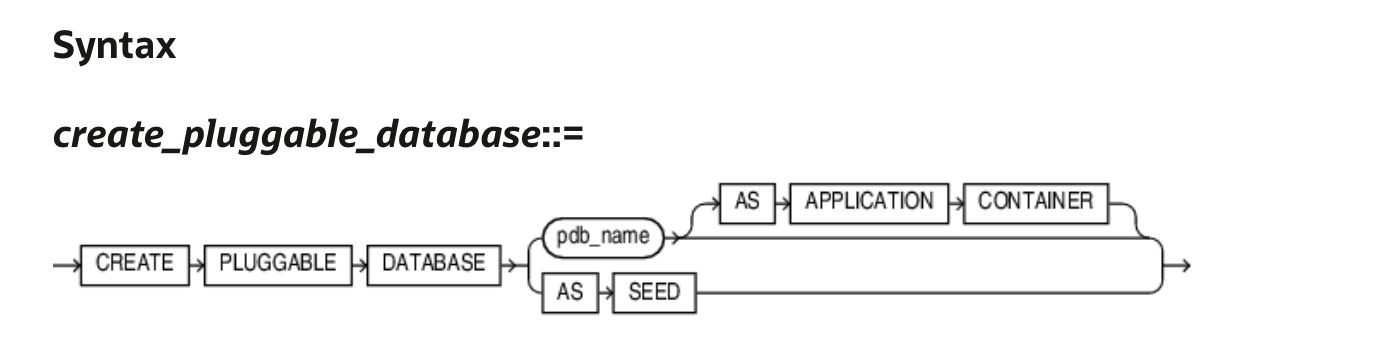
The semantics for pdb_name lists:
The name must satisfy the requirements listed in “Database Object Naming Rules”. The first character of a PDB name must be an alphabet character. The remaining characters can be alphanumeric or the underscore character (_).
Let’s take a look at the Database Object Naming Rules:
… However, database names, global database names, database link names, disk group names, and pluggable database (PDB) names are always case insensitive and are stored as uppercase. If you specify such names as quoted identifiers, then the quotation marks are silently ignored. …
- Names of disk groups, pluggable databases (PDBs), rollback segments, tablespaces, and tablespace sets are limited to 30 bytes.
So, AutoUpgrade is just playing by the rules.
The Answer
So, the answer is that the database use PDB names in alphanumeric uppercase. AutoUpgrade knows this and automatically converts to uppercase. The customer must accept that PDB names are uppercase.
These are the requirements for the PDB names
- First character must be an alphabet character.
- The name must be all uppercase.
- The name can contain alphanumeric (A-Z) and the underscore (_) characters.
- No longer than 30 bytes.
- Don’t try to enquoute the name.
- Nonquoted identifiers (like PDB names) cannot be Oracle SQL reserved words.
- The PDB name must be unique in the CDB, and it must be unique within the scope of all the CDBs whose instances are reached through a specific listener.
Daniel’s Recommendation
I recommend that you use globally unique PDB names. In your entire organization, no PDBs have the same name. That way, you can move PDBs around without worrying about name collisions.
I know one customer that generates a unique number and prefix with P:
- P00001
- P00002
- P00003
They have a database with a simple sequence and a function that returns P concatenated with the sequence number. The expose the function in their entire organization through a REST API using ORDS. Simple and yet elegant.
Final Words
I’ve spent more than 20 years working with computers. I have been burnt by naming issues so many times that I’ve defined a law: Daniel’s law for naming in computer science:
- Use only uppercase alphanumeric characters
- US characters only (no special Danish characters)
- Underscores are fine
- Never use spaces
- Don’t try to push your luck when it comes to names :-)
 Databases Are Fun