
Here is a list of things to check and carry out while preparing for Oracle AI Database 26ai.
These tasks are not mandatory, but I recommend them based on my experience. It increases your chances of upgrading successfully.
Weeks Before
Versioning
Oracle AI Database 26ai introduces a new versioning schema. Although 26ai replaces 23ai, in the database, the version remains the same:
After upgrade to 26ai, the version remains 23.0.0.0.0:
SQL> select version from v$instance;

VERSION
-------
23.0.0.0.0
If you check version_full, you’ll see that the second digit reflects the new version:
SQL> select version_full from v$instance;

VERSION
-------
23.26.0.0.0
Platform Certification
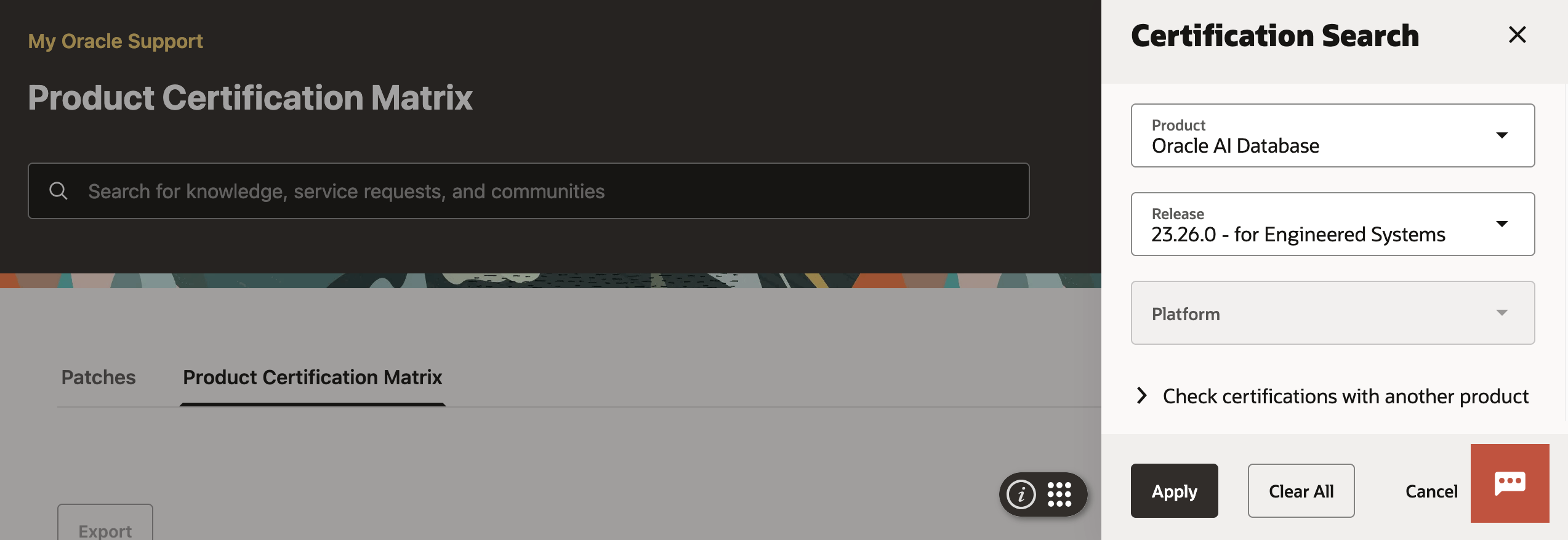
Ensure that the new release supports your operating system. When available, you can check it in the installation guides. However, you can find the most up-to-date information in the Product Certification Matrix tab in My Oracle Support.
Clients
Check which clients are connecting to the database and ensure their client driver versions are compatible with Oracle AI Database 26ai. The client/server interoperability matrix gives you an overview of which clients work with which servers.
| Client | Database 26ai | Database 19c |
|---|---|---|
| 26ai | Yes | Yes |
| 21c | Yes | Yes |
| 19c | Yes | Yes |
| 18c | No | Yes |
| 12.2.0.1 | No | Yes |
| 12.1.0.2 | No | Yes |
| 11.2.0.4 | No | Yes |
19c supports much older clients compared to 26ai. If you’re using such old clients, start upgrading them right away. This also applies to database links.
Optionally, monitor the database over time to generate a list of clients connecting.
AutoUpgrade
Get the latest version of AutoUpgrade from My Oracle Support. I recommend that you always use the latest version. AutoUpgrade is fully backward compatible, so any newer version can upgrade older releases of Oracle AI Database.
Upgrade Readiness
Run AutoUpgrade in analyze mode to determine your database’s upgrade readiness. Check the summary report for findings with no fixups. Such findings must be dealt with manually.
You can run the analysis even before you install the new Oracle home. Simply specify target_version=26 in your AutoUpgrade config file, and AutoUpgrade knows which checks to run.
Dictionary Check
Check the dictionary in your most important databases. You can run a dictionary check together with an AutoUpgrade analysis. In your config file:
upg1.run_dictionary_health=full
Or, you can run it separately using DBMS_DICTIONARY_CHECK.
Behavior Changes
Review the upgrade guide for information on deprecated and desupported features, plus any behavior changes.
Also, use ORAdiff to check for changes between your current release and 26ai. Use the Report menu item to generate a report that you can share with your company.
It’s also a good idea to look at the new reserved keywords. Especially, those marked as reserved. Don’t use those keywords in object/column names, queries, or the like.
Grid Infrastructure
-
If Grid Infrastructure manages your database either in RAC or Oracle Restart configuration, you should upgrade it as well. If you can tolerate an additional maintenance window, I’d recommend upgrading Grid Infrastructure in advance.
-
Grid Infrastructure 26ai can manage databases from 19c and onwards. Any older database must be moved away from the system.
-
I recommend keeping the GI and database patch levels in sync. If you want to upgrade the database to 26.1, then upgrade GI to the same Release Update. If that’s not possible, at least keep it within two Release Updates.
Days Before
Statistics
Gather dictionary and fixed objects statistics:
begin
   dbms_stats.gather_fixed_objects_stats;
   dbms_stats.gather_schema_stats('SYS');
   dbms_stats.gather_schema_stats('SYSTEM')
end;
-
I prefer gathering schema stats rather than dictionary stats. I’ve seen a few edge cases solved by schema stats, and generally, current stats on SYS and SYSTEM are sufficient.
-
Gather statistics no earlier than seven days before the upgrade. If AutoUpgrade determines your statistics are older than that, it will gather them as part of the upgrade. This extends downtime unnecessarily.
-
If you’re curious, you can find details about the importance of fixed objects statistics in a blog post by Maria Colgan.
Install Oracle Home
You can use AutoUpgrade to:
In release 26ai, the Oracle homes that you download are already patched with the latest Release Update and OPatch.
Remember to install the new pre-install package:
dnf install oracle-ai-database-preinstall-26ai
On the Day of Upgrade
Backup
If time allows, run a level 0 backup. If not, you have to settle with a level 1.
Don’t run the backups inside your maintenance windows; that’s a waste of downtime. Start the backup in advance, so it finishes just before the maintenance window begins.
AutoUpgrade automatically creates a guaranteed restore point before starting the upgrade.
Scheduler
Normally, it is not necessary to disable the scheduler. But in some situations, it can be beneficial.
That’s It
You are now ready to begin your journey to Oracle AI Database 26ai and its many exciting new features.
Check the other blog posts related to upgrade to Oracle AI Database 26ai.
Happy upgrading!
 Databases Are Fun
Hi Daniel,
I’m trying to create a new oracle home to test migration from non-cdb to cdb, but autoupgrade (either for that bad update from my oracle support) or for some update on OL9 stopped working with this error:
There was a problem restoring the previous settings oracle.commons.config.CommonSettings; local class incompatible: stream classdesc serialVersionUID = 779857699601680125, local class serialVersionUID = -7837297313499418162
Please don’t ask me to open a ticket, I care about my mental health ;)
LikeLike
Hi Leonardo,
Could you try to change the global.global_log_dir to a new, empty folder? Looks like AutoUpgrade is trying some sort of restoring of a previous session.
If that won’t work, we’ll need to check the logs:
https://dohdatabase.com/auzip
Regards,
Daniel
P.S. Let’s see if you can get you sorted without an SR for now.
LikeLike
Thanks Daniel, great post. I am just sad that support has changed and even your “Certifications” (https://support.oracle.com/epmos/faces/CertifyHome) hyperlink is not working anymore.
LikeLike
Hi Mustafa,
Oh yeah, I see that. I wonder where it went. I’ll get on that right away. Thanks for the heads up and the positive feedback – much appreciated.
Regards,
Daniel
LikeLiked by 1 person
I assume the second statement should read: select version_full from v$instance;
LikeLike
Hi Martin,
Good catch – thanks! :)
Regards,
Daniel
LikeLike