

Here’s a blog post series about patching Oracle Data Guard in single instance configuration. For simplicity, I am patching with Oracle AutoUpgrade to automate the process as much as possible.
First, a few ground rules:
- Always use out-of-place patching
- You must have the same set of patches on primary and standby
The Methods
There are three ways of patching Data Guard:
All At Once
- You patch all databases at the same time.
- You need an outage until you’ve patched all databases.
- You need to do more work during the outage.
- You turn off redo transport while you patch.
Standby-first with restart
- All the patches you apply must be standby-first installable (see appendix).
- You need an outage to stop the primary database and restart it in the target Oracle home.
- During the outage, you have to do less work to do compared to all at once and less work overall compared to standby-first with switchover.
- The primary database remains the same. It is useful if you have an async configuration with a much more powerful primary database or just prefer to have a primary database at one specific location.
Standby-first with switchover
- All the patches you apply must be standby-first installable (see appendix).
- You need an outage to perform a switchover. If your application is well-configured, users will just experience it as a brownout (hanging for a short period while the switchover happens).
- During the outage, you have little to do, but overall, there are more steps.
- After the outage, if you switch over to an Active Data Guard, the workload from the read-only workload has pre-warmed the buffer cache and shared pool.
Summary
| All at one | Standby-first with restart | Standby-first with switchover |
|---|---|---|
| Works for all patches | Works for most patches | Works for most patches |
| Bigger interruption | Bigger interruption | Smaller interruption |
| Downtime is a database restart | Downtime is a database restart | Downtime/brownout is a switchover |
| Slightly more effort | Least effort | Slightly more effort |
| Cold database | Cold database | Pre-warmed database if ADG |
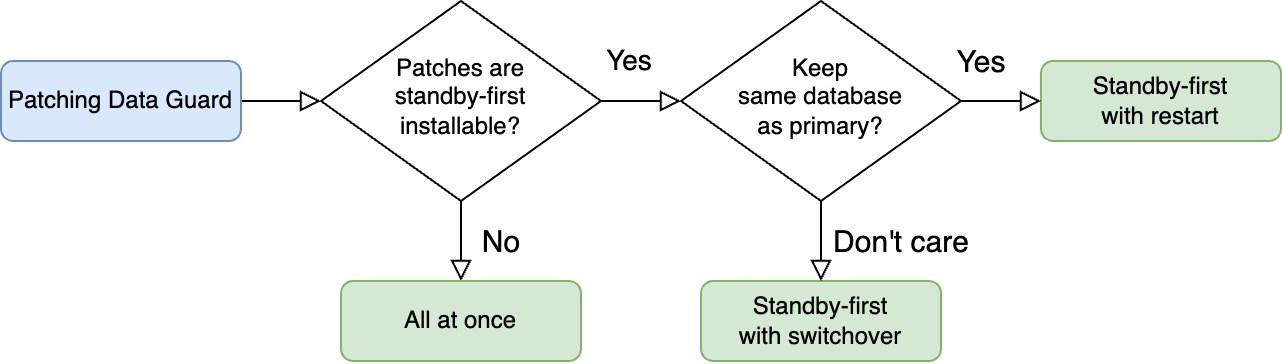
Here’s a decision tree you can use to find the method that suits you.
What If
RAC
These blog posts focus on single instance configuration.
Conceptually, patching Data Guard with RAC databases is the same; you can’t use the step-by-step guides in this blog post series. Further, AutoUpgrade doesn’t support all methods of patching RAC databases (yet).
I suggest that you take a look at these blog posts instead:
- How to Patch Oracle Grid Infrastructure 19c Using Out-Of-Place SwitchGridHome
- How to Apply Patches Out-of-place to Oracle Grid Infrastructure and Oracle Data Guard Using Standby-First
Or even better, use Oracle Fleet Patching and Provisioning.
Oracle Restart
You can use these blog posts if you’re using Oracle Restart. You can even combine patching Oracle Restart and Oracle Database into one operation using standby-first with restart.
We’re Really Sensitive To Downtime?
In these blog posts, I choose the easy way – and that’s using AutoUpgrade. It automates many of the steps for me and has built-in safeguards to ensure things don’t go south.
But this convenience comes at a price: sligthly longer outage. Partly, because AutoUpgrade doesn’t finish a job before all post-upgrade tasks are done (like Datapatch and gathering dictionary stats).
If you’re really concerned about downtime, you might be better off with your own automation, where you can open the database for business as quickly as possible while you run Datapatch and other post-patching activities in the background.
Datapatch
Just a few words about patching Data Guard and Datapatch.
- You always run Datapatch on the primary.
- You run Datapatch just once, and the changes to the data dictionary propagates to the standby via redo.
- You run Datapatch when all databases are running out of the new Oracle home or when redo transport is turned off. The important part is that the standby that applies the Datapatch redo must be on the same patch level as the primary.
Happy patching
Appendix
Standby-First Installable
You can only perform standby-first patch apply if all the patches are marked as standby-first installable.
Standby-first patch apply is when you patch the standby database first, and you don’t disable redo transport/apply.
You can only use standby-first patch apply if all the patches are classified as standby-first installable. For each of the patches, you must:
- Examine the patch readme file.
- One of the first lines will tell if this specific patch is standby-first installable. It typically reads: > This patch is Data Guard Standby-First Installable
Release Updates are always standby-first installable, and so are most of the patches for Oracle Database.
In rare cases, you find a non-standby-first installable patch, so you must patch Data Guard using all at once.
Other Blog Posts in the Series
- Introduction
- How To Patch Oracle Data Guard Using AutoUpgrade For Non-Standby-First Installable Patches
- How To Patch Oracle Data Guard Using AutoUpgrade And Standby-First Patch Apply With Restart
- How To Patch Oracle Data Guard Using AutoUpgrade And Standby-First Patch Apply With Switchover
- Avoid Problems on the Primary Database by Testing on a Snapshot Standby


Hi,
In recent 25.6 release of Autoupgrade script there is an Enhancement mentioned in change log regarding Data Guard standby database patching:
AUPG-4413
AutoUpgrade Patching now supports patching a standby database
However, I don’t find any details in documentation or anywhere about this and how this is possibly changing or improving patching of Data Guard environment via autoupgrade. Do you have more details about this?
LikeLike
Hi,
I have a few blog posts on the topic:
I’ve recently been in touch with several customers who have already used it successfully. Give it a try and let me know how it turns out.
Regards,
Daniel
LikeLike
Hi,
Alright. I have also tested it and ran successful patching of our Data Guard environments following your instructions. But I have been using older versions of autoupgrade so here I was more after information about if there is something changed particularly in this 25.6 version regarding Data Guard standby patching because it was mentioned there as an Enhancement for this version.
I just last week though tested patching of Data Guard environment with this 25.6 version and it seemed to work similarly as before in my eyes.
Regards,
Janne-Pekka Lantto
LikeLike
Hi,
Thanks for the feedback. It’s great that you’ve used it already successfully.
If I recall correctly, the integration between the patching part of AutoUpgrade and the standby handling has been completed fully.
Also, when you patch with standby-first, you can now use AutoUpgrade to run “Datapatch” on the primary database. You do that by starting AutoUpgrade in “upgrade” once all databases in the Data Guard config is running on the new binaries.
I hope to be able to update my blog posts in near future.
Regards,
Daniel
LikeLike
Hi,
Alright, thanks for this answer!
Regards,
Janne-Pekka Lantto
LikeLike