

The other day, someone asked:
I need the fix for bug 35836860 in my Oracle Database. I am planning to install the Release Update 19.21.0. How do I know if this Release Update includes the patch?
What is the easiest way to tell whether a Release Update contains a specific patch for Oracle Database?
How To
The easiest way to check for patch inclusion is ORAdiff.
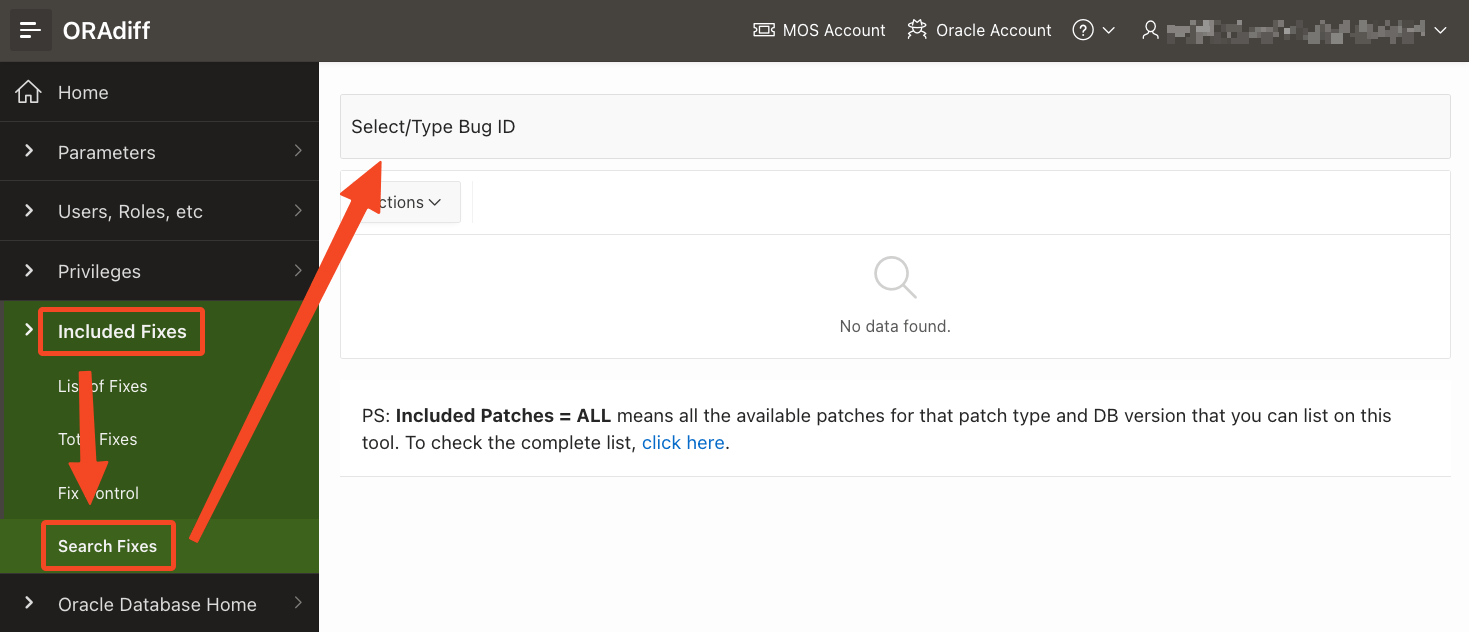
I navigate to Included Fixes and Seach Fixes and input the bug number.
Next, the report tells me that Release Update 19.22.0 includes this patch. All newer Release Update include this patch as well because Release Updates are always cumulative.

I can even see that MRP 4 to 6 for 19.20.0 also includes this fix. For whatever strange reason, the MRPs for 19.21.0 do not include this fix. Here’s a video if you want to learn more about MRPs.
ORAdiff
Remember that ORAdiff is a free tool for anyone with an Oracle account.
If you need further tips on using ORAdiff, we have a playlist on our YouTube channel. Be sure to subscribe so you don’t miss out on anything.
Want More?
Since we are talking about patching Oracle Database, it might be good to refresh your knowledge with our webinar Oracle Database Release and Patching Strategy for 19c and 23ai.
Open the video on YouTube, and you can dive right into each individual chapter.
 Databases Are Fun