How to Patch Oracle Database on Exadata Cloud@Customer using Out-Of-Place

At our recent workshop in London, I was advocating for using out-of-place patching and the many benefits it brings. One of the questions was:

How do I do that on Exadata Cloud@Customer?

When you use the patching functionality in the cloud tooling, it will patch an entire Oracle home, including all databases, using in-place patching. This is a convenient option, but it extends the maintenance window on your database.

Let’s find out how to do it using out-of-place patching!

Benefits of Out-Of-Place Patching

  • You can patch the database with less downtime. You just shut down the database in the old Oracle home and immediately restart it in the new Oracle home.
    • With in-place patching, you need more downtime. While the database is down, you need time to roll off patches and apply the new ones. Depending on the number of patches you have, this can take 5, 10, or 20 minutes.
  • You prepare the new Oracle home in advance.
    • With in-place patching, all changes to the Oracle home occur during the maintenance window when the database is down.
  • There are fewer tasks in your downtime window, so less risk and less stress.
  • You can use a fresh, brand-new Oracle home to avoid issues with rolling off patches. Plus, a brand-new Oracle home means you don’t carry any old luggage in your Oracle home.
    • With in-place patching, your Oracle home will grow over time. You’ll see that disk space keeps increasing.
  • In the unlikely event that you need to roll back or fall back, that’s a lot easier. You just restart the database in the old Oracle home.
    • With in-place patching, you have to reverse the entire process. So, all that was cumbersome when you patched will be cumbersome when you roll back.

AutoUpgrade

In the workshop, I showed some cool demos of using AutoUpgrade for out-of-place patching. You can’t do that on Exadata Cloud@Customer. You must use the cloud tooling when you patch an entire CDB.

Alternatively, you can patch an individual PDB using AutoUpgrade and refreshable clone PDBs. I’ll have to write a blog post about that.

How to Patch Out-Of-Place on Exadata Cloud@Customer

  1. Create a software image at the desired Release Update with any additional one-off patches. You can skip this if you want to use the Oracle-provided images.
  2. Create a database home using the software image you just created, or use an Oracle-provided one.
  3. I recommend that you update the cloud tooling.
  4. Your maintenance window starts.
  5. Move the database to the new Oracle home. The cloud tooling does that in a rolling manner, so there’s no database outage.
    • It also executes Datapatch and other post-patching steps.

That’s it; your database has been patched!

  • After a while, you can remove the old Oracle home.
  • If you want to script the process, you can also use the REST APIs or dbaascli.
  • This also works for Exadata Database Service.
  • There’s no way to use out-of-place patching on Grid Infrastructure.

Happy patching!

Appendix

Other Methods

You are free to use Exadata Fleet Update for your Exadata Cloud@Customer system. It can greatly reduce your workload and automate your patching operations. Check out these resources:

Further Reading

Which Grid Infrastructure Should I Install on My Brand New Exadata?

I received a question from a customer:

We just got a brand-new Exadata. We will use it for critical databases and stay on Oracle Database 19c for the time being. Which Grid Infrastructure should we install: 19c or 23ai?

I recommend installing Oracle Grid Infrastructure 19c (GI 19c).

The Reason

GI 19c has been out since 2019. It is currently at the 23rd Release Update (19.26), and used on many thousands of systems. Those systems include some of the most critical systems you can find.

GI 19c is a very proven release that has reached a very stable state. Proven and stable – two attributes that are very valuable for a mission-critical system.

Additionally, I would apply the latest Release Update – at the time of writing that’s 19.26. Also, I would include fixes from Oracle Database 19c Important Recommended One-off Patches (Doc ID 555.1).

Further, I would ensure the databases were on the same Release Update, 19.26. If that’s impossible, at least keep the database within two Release Updates of Grid Infrastructure, so, minimum 19.24.

In this case, the customer migrates the databases from a different platform onto the new Exadata system. The source database is already running GI 19c, and keeping the same GI release on the new system means there’s one less change to deal with.

Why Not Oracle Grid Infrastructure 23ai?

First, there’s absolutely nothing wrong with the quality of Oracle Grid Infrastructure 23ai (GI 23ai).

When I recommend GI 19c over GI 23ai, it is a matter of choosing between two good options.

But GI 23ai has been out for Exadata for over half a year. Much less than GI 19c, which is about to reach six years of general availability.

Every piece of software as a few rough edges to grind off and I would expect that for GI 23ai as well.

For a mission-critical system, there’s no need to take any chances, which is why I recommend GI 19c.

When To Use Oracle Grid Infrastructure 23ai

If the customer wants to use Oracle Database 23ai – either now or in the foreseeable future – then they should install GI 23ai. No doubt about that.

Also, for less critical systems, including test and development systems, I would recommend GI 23ai as well.

Why Not Both?

I added this after a report on LinkedIn by my colleague, Alex Blyth.

Alex agrees with my recommendation but adds the following:

What I also would have said is, you can have your cake, and you can eat it too. This means Exadata can do more than one thing at a time. With virtualization, you can have a VM cluster with 19c Database and GI for critical databases, and another VM cluster (up to 50 per DB server with X10M / X11M and the latest Exadata System Software) that is running DB and GI 23ai. What’s more, you could also deploy Exadata Exascale and take advantage of the high-performance shared storage for the VM images, and the awesome instant database snapshot and cloning capabilities for DB 23ai.

He raises a really good point.

Exadata is the world’s best database platform and the flexibility it offers with virtualization would allow this customer the stability they need for their mission-critical database, plus, getting started with the many new features on 23ai.

The best of both worlds!

Final Words

Although I work in the upgrade team and love upgrades, I don’t recommend them at any cost.

For mission-critical systems, stability and maturity are paramount, and that influences my recommendation of GI 19c.

But get started with Oracle Grid Infrastructure and Database 23ai today. Install it in your lab and then on your less important systems. There are many great enhancements to exploring on Oracle Database 23ai.

Prepare yourself for the next release in due time.

Zero Downtime Migration – Physical Online Migration to ExaCS

This will be an easy blog post. To migrate your Oracle Database to Exadata DB System (ExaCS), just follow this procedure from the DBCS blog post. Plus, execute these two commands on the target after the migration:

[root@tgthost]$ dbaascli registerdb prereqs --dbname [db_name] --db_unique_name [db_unique_name]
[root@tgthost]$ dbaascli registerdb begin --dbname [db_name] --db_unique_name [db_unique_name]

More Details, Please

Granted – the above statement is bold and it is almost true. There are a few important details to share. First, have a look at Additional Information for Migrating to Exadata Cloud Service which you find the Release Notes

Target Environment

To get the full benefits of Exadata you should be running RAC databases. Exadata and RAC is a perfect match but it is up to you to decide. If your source database is already a RAC database (or RAC One Node) you must migrate to a RAC database. However, if your source database is a single instance you have to option to either stay single instance or go RAC. If you go RAC, just create the target placeholder database as a RAC database, and everything else will happen automatically.

You must create a placeholder database on the target system. The placeholder database gets overwritten ZDM during the migration but it is initially used by ZDM to get information on how you want to configure your target database in OCI. For example, the migrated database will be placed in the same Oracle Home as the target placeholder database. Also, the architecture is determined this way. In other words, if you create the target placeholder database as a RAC database; then your source database is automatically converted to a RAC database during migration. If you create a single instance placeholder database; you get a single instance database.

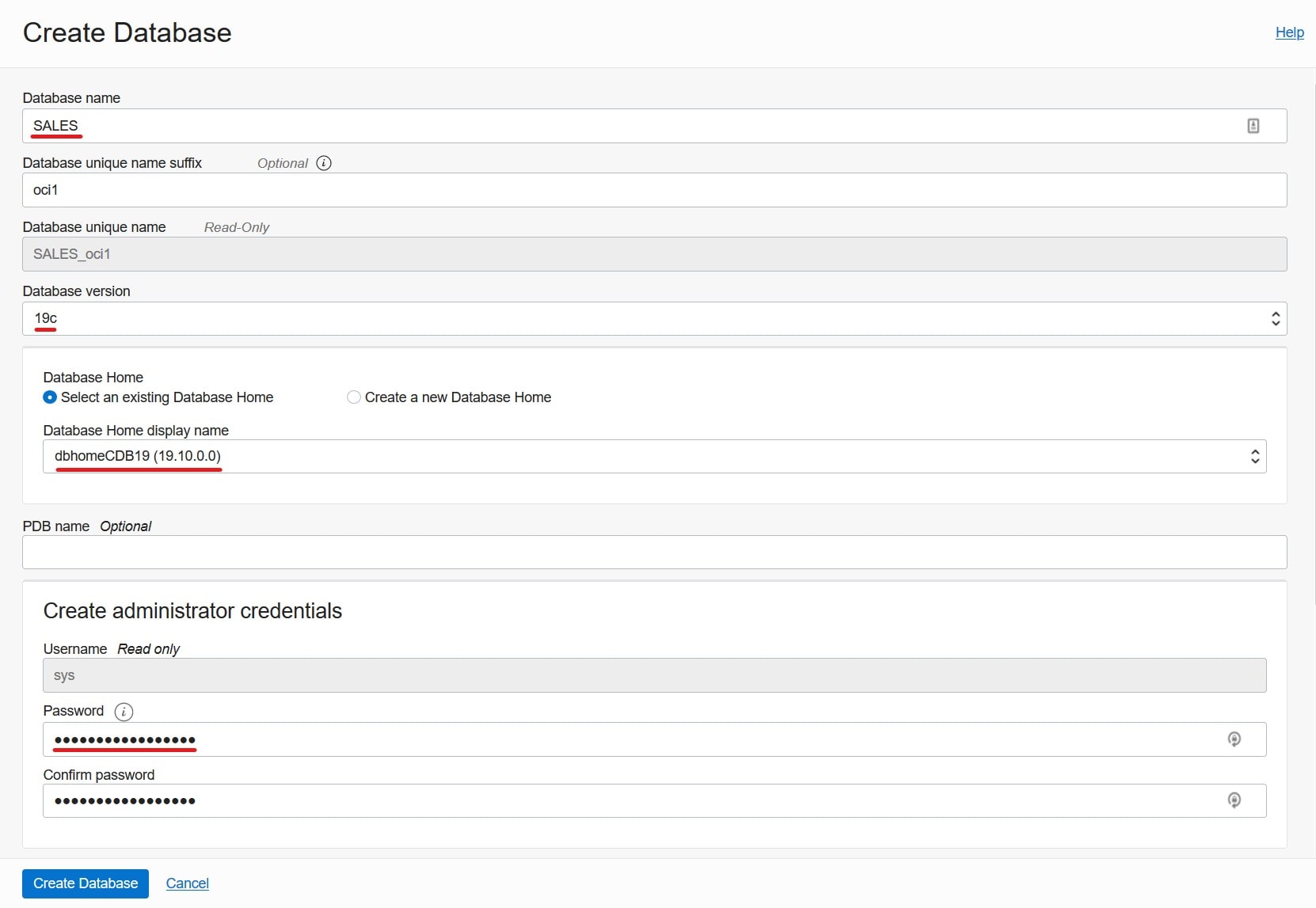
Just like any other migration, when creating the placeholder database there are some things you should be aware of. On the OCI webpage you have to:

  • Set Database name to the DB_NAME of the source database.
  • Set Database version to the same as the source database.
  • Ensure the patch level of the Oracle Home match that of the source system – or be higher.
  • Ensure that the Password matches the SYS password of the source database.

When using Zero Downtime Migration (ZDM) to migrate to Exadata DB System (ExaCS) be sure to create the target placeholder database in the correct manner.

You can choose your own DB_UNIQUE_NAME – it should differ from the source database. Select an Oracle Home that has the same or higher patch level than your source database. I recommend to always migrate to the latest Release Update. If necessary, ZDM will automatically invoke datapatch after the switchover. The other parameters don’t matter – the database gets overwritten anyway by ZDM. Also, be aware when using the OCI webpage you get a RAC database. There is no option to change it. But it is after all the perfect match for Exadata anyway.

Now, if you want more advanced options – like creating a single instance database, you can’t use the OCI webpage. You will have to use either dbaaspi or dbaascli. That gives you full control over the options – but they are not as easy to use as the webpage.

It’s A Wrap

I have created a video on YouTube that demos a migration to Exadata DB System.

Speaking of YouTube, I suggest that you subscribe to the Oracle Database Upgrades and Migrations YouTube channel so you never miss anything.

The Exadata Cloud Service is an awesome platform and it is really easy to migrate to it using Zero Downtime Migration. And converting to RAC is even easier.

Other Blog Posts in This Series