AutoUpgrade New Features: Create Oracle Home Path Dynamically

Some customers prefer to install Oracle homes in a path that indicates the patch level, like:

/u01/app/oracle/dbhome_1928

1928 indicates this is Oracle Database 19c with Release Update 28. If you use AutoUpgrade to create your Oracle home, you can specify that path in your config file:

patch1.target_home=/u01/app/oracle/dbhome_1928

To ease automation, AutoUpgrade can dynamically determine the target Oracle home using placeholders. After downloading the patches, it checks which Release Update it will apply.

patch1.target_home=/u01/app/oracle/dbhome_%RELEASE%%UPDATE%

Easier Patching

Take a look at this config file

global.global_log_dir=/home/oracle/autoupgrade-patching/log
global.keystore=/home/oracle/autoupgrade-patching/keystore
global.folder=/home/oracle/patch-repo
patch1.source_home=/u01/app/oracle/product/dbhome_1927
patch1.target_home=/u01/app/oracle/product/dbhome_%RELEASE%%UPDATE%
patch1.sid=FTEX
patch1.patch=RECOMMENDED
  • patch=RECOMMENDED or even patch=RU would always get the latest Release Update. At time of writing, that would be 19.28.
  • target_home contains the placeholders. After AutoUpgrade determined that 19.28 is the latest Release Update, it would dynamically determine the Oracle home path.
  • You would still need to update source_home in the config file. It will change after each run because you use out-of-place patching.

Now, you can just start AutoUpgrade every quarter:

java -jar autoupgrade.jar \
     -config FTEX.cfg \
     -patch \
     -mode deploy
  • AutoUpgrade downloads the latest Release Update and builds a new Oracle home for your – with a dynamically created path reflecting the Release Update.

Ain’t that easy?

Other Release Updates

What if you want to install an older Release Update. That works too:

patch1.target_home=/u01/app/oracle/product/dbhome_%RELEASE%_%UPDATE%
patch1.patch=RU:19.27,OPATCH

This will install the Oracle home in:

/u01/app/oracle/product/dbhome_19_27

Even Easier

Here’s another way. It requires that the environment is set correctly and works entirely without a config file.

export ORACLE_SID=FTEX
export ORACLE_HOME=/u01/app/oracle/product/19
export AU_LOG_DIR="/home/oracle/autoupgrade-patching/log_"`date +%Y%m%d_%H%M%S`
java -jar autoupgrade.jar \
     -config_values "global.global_log_dir=$AU_LOG_DIR,global.folder=/home/oracle/patch-repo,download=no,target_home=/u01/app/oracle/product/dbhome_%RELEASE%%UPDATE%,patch=RECOMMENDED" \
     -patch \
	 -mode deploy
  • AutoUpgrade takes sid and source_home from the environment variables ORACLE_SID and ORACLE_HOME.
  • Then you specify other parameters as a comma-separated list using -config_values.
  • Notice the target_home with placeholders in the long list of parameters.
  • The AutoUpgrade logging directory uses a timestamp to ensure a new one is used on each invocation.

Final Words

It’s now easier to automate creation of Oracle homes using AutoUpgrade.

Do you think this feature is useful? Do you need other replacement variables?

Leave a comment below and let me know.

Where Is The OJVM Bundle Patch For Oracle Database 23ai?

A customer asked me:

Where do I download the OJVM bundle patch for Oracle Database 23ai? I can’t find it anywhere.

In Oracle Database 23ai, Oracle ships fully updated gold images instead of individual Release Updates. The customer installed the latest gold image and it didn’t contain the OJVM bundle patch:

$ORACLE_HOME/OPatch/opatch lspatches
37701424;OCW RELEASE UPDATE 23.8.0.25.04 (37701424) Gold Image
37701421;Database Release Update : 23.8.0.25.04 (37701421) Gold Image

In Oracle Database 19c, you would be able to see the OJVM bundle patch as a separate patch:

$ $ORACLE_HOME/OPatch/opatch lspatches
35648110;OJVM RELEASE UPDATE: 19.21.0.0.231017 (35648110)
35643107;Database Release Update : 19.21.0.0.231017 (35643107)
29585399;OCW RELEASE UPDATE 19.3.0.0.0 (29585399)

Why is it missing from Oracle Database 23ai gold image and why can’t you download it separately?

OJVM In Oracle Database 23ai

Starting in Oracle Database 21c, there is no longer a separate OJVM bundle patch. Instead, the fixes are fully included in the Release Updates.

… the OJVM component patch has been incorporated within the 21c Database Release Update (RU) patch

Oracle Recommended Patches – “Oracle JavaVM Component Database PSU and Update” (OJVM PSU and OJVM Update) Patches (Doc ID 1929745.1)

Also, there is no longer any interuption or brownout when you start Datapatch. The OJVM fixes are now fully RAC Rolling Installable and Standby-First Installable.

So, just get the newest gold image in Oracle Database 23ai and that’s it.

What About Oracle Database 19c

Let’s just recap the situation when you have OJVM in Oracle Database 19c.

  • The patch is RAC Rolling Installable
  • Standby-First Installable (as long as you don’t have Active Data Guard and extensively use OJVM on the standby database)

First, are you using OJVM or can you remove it?

Then, how do you patch OJVM?

  1. Start by downloading the OJVM bundle patch.
    1. Use AutoUpgrade and include the OJVM keyword in your patch specification, like patch1.patch=OPATCH,RU,OJVM
    2. Use the Download Assistant on My Oracle Support
  2. When you start Datapatch and it applies the OJVM fixes, there is a short brownout while the Java system is reloaded. Any session that tries to use Java at that point will get ORA-29548 but will be able to retry after a few seconds.

Here’s a little video with additional information.

What About Grid Infrastructure?

You should not apply the OJVM bundle patch to your Grid Infrastructure homes.

OJVM PSU is not needed in the Grid home, only in the database home.

Oracle Recommended Patches – “Oracle JavaVM Component Database PSU and Update” (OJVM PSU and OJVM Update) Patches (Doc ID 1929745.1)

Happy patching!

AutoUpgrade New Features: Run root.sh After Oracle Home Creation

AutoUpgrade relies on out-of-place patching, thus, it creates a new Oracle home. After installing a new Oracle home, you must execute root.sh as the root user.

AutoUpgrade now does this for you under the following circumstances:

  • oracle user has sudo privileges.
  • The sudo command doesn’t require a password.

AutoUpgrade handles root.sh in the ROOTSH stage, and writes log messages to <autoupgrade_log_dir>/<sid>/<job-no>/rootsh/rootsh.log.

Sudo Privileges

If oracle has sudo privileges, no configuration is needed. AutoUpgrade sees this and automatically executes root.sh after installing the Oracle home and applying the desired patches.

What If

If AutoUpgrade can’t execute root.sh, you must do it manually. AutoUpgrade writes a message into the rootsh.log:

2025-03-24 07:39:22.297 INFO Root Script Path : /u01/app/oracle/product/19_25/root.sh - RootScript.executePatchStage#66
2025-03-24 07:39:22.305 INFO Executing Root Script - RootScript.updateAndLogInfoMessage#91
sudo: a password is required
2025-03-24 07:39:22.327 INFO Root script execution failed sudo: a password is required
 - RootScript.executeRootScript#112
2025-03-24 07:39:22.327 INFO AutoUpgrade Patching has not run /u01/app/oracle/product/19_25/root.sh for the newly installed ORACLE_HOME. This needs to be performed manually after AutoUpgrade Patching completes. - RootScript.executePatchStage#83

If AutoUpgrade can’t run the root.sh for you, you shouldn’t use the one-button approach, where it handles everything in one operation. Instead, you should follow this approach:

  • Install the new Oracle home using -mode create_home.

  • Manually run root.sh.

  • Patch the database using -mode deploy. AutoUpgrade sees that you’ve already created the new Oracle home, and skips that part.

Why do you need to do it in multiple steps?

Some functionality in the database requires that you run root.sh. Also, there are certain patches that require you to run root.sh before starting the database. One example is patch 34672698, ORA-00800: SOFT EXTERNAL ERROR, ARGUMENTS: [SET PRIORITY FAILED], [VKTM] , DISM(16). Suppose you haven’t set the proper file permissions with root.sh before starting the database, the database won’t be able to elevate the priority of some of the most critical background processes.

The Special Patches

As mentioned above, there are some special patches that require that you fiddle with file system permissions during the apply.

One example is patch 34672698, ORA-00800: SOFT EXTERNAL ERROR, ARGUMENTS: [SET PRIORITY FAILED], [VKTM] , DISM(16). Check the readme to see the instructions explaining how to change permissions on $ORACLE_HOME/bin/oradism.

Using AutoUpgrade, installing such a patch is very easy. AutoUpgrade takes all that into consideration. This is how AutoUpgrade creates the new Oracle home:

  • Unzip the Oracle home.
  • Installs the Oracle home using runInstaller, but doesn’t run root.sh.
  • Applies patches using OPatch, including such special patches.
  • Executes root.sh, which applies all the required file permissions.

The execution of root.sh in the end takes care of all the extra work with permissions.

Happy patching!

How to Patch Oracle Net Listener

When running Oracle Database on a server, the Oracle Net Listener is a vital component.

Let’s discuss how you can patch it.

The Basics

Normally, on a server, you have:

  • One listener
  • One or many database instances

That one listener handles new connections to all database instances. You patch the listener simply by starting it in the new Oracle home.

You can have multiple listeners and use remote listeners, but if you do that, you’re smart and probably won’t need the advice in this blog post.

How to Patch the Listener

  1. Copy listener.ora from the old Oracle home to the new Oracle home.
    export OLD_ORACLE_HOME=/u01/app/oracle/product/19.26.0/dbhome_1
    export NEW_ORACLE_HOME=/u01/app/oracle/product/19.27.0/dbhome_1
    cp $OLD_ORACLE_HOME/network/admin/listener.ora $NEW_ORACLE_HOME/network/admin
    
    • You can avoid this step by redirecting the location of your network files using the TNS_ADMIN environment variable.
    • If you have a completely default installation with no listener configuration, you don’t have a listener.ora file and can skip this step.
    • In an advanced configuration you might have references to the listener Oracle home. Those you must update. But don’t confuse the listener Oracle home, with the Oracle homes of the databases with static registration. Those you update, when you patch the matching database.
  2. Restart the listener in the new Oracle home:
    export ORACLE_HOME=$OLD_ORACLE_HOME
    $OLD_ORACLE_HOME/bin/lsnrctl stop
    export ORACLE_HOME=$NEW_ORACLE_HOME
    $NEW_ORACLE_HOME/bin/lsnrctl start 
    
    • If you use Oracle Grid Infrastructure or Oracle Restart, they manage the listener. You automatically restart, and thus patch, the listener when you patch those components.
  3. If you use the dbstart script to start the listener, update it with the new Oracle home.
    • On Windows, you must delete the matching Windows service when you stop the listener. The lsnrctl start command should create a new listener. Be sure to set it to start automatically.

The Outage

  • When you restart the listener, there’s a short period where there’s no listener. It takes a second or so for the new listener to start. In that period, any new connection attempt fails:

    ORA-12541: TNS:no listener
    

    This affects new connections only. Existing connections continue to work unaffected.

  • As soon as the listener starts, it’ll read listener.ora and go through the static listener registrations defined by the SID_LIST. Connections to those databases are ready immediately.

  • For optimal flexibility, however, it’s better to use dynamic listener registration, where the database instance automatically registers with the listener. When you restart the listener, it doesn’t know of all the dynamic registrations and will have to wait until the database registers (up to 60 seconds).

    • You can force a database to register with the listener:
      SQL> alter system register;
      
    • It’s a good idea to run through all of your databases after the listener restart and force a listener registration with the above command.
    • Until the dynamic registration completes, any new connection to the database will fail:
      ORA-12514: TNS:listener does not currently know of service requested in connect descriptor
      
  • You can hide the short outage from the client by using RETRY_COUNT and RETRY_DELAY in your connect strings. Allow the client to retry for a short period before throwing the above errors.

  • You can avoid the outage completely by using multiple listeners and patching them separately. Your connect strings should have an ADDRESS_LIST containing both listeners.

Do I Need to Patch the Listener and Database At the Same Time?

No, that’s up to you. If you want just one interruption, then do it all at once. Otherwise, you can do it in separate maintenance windows.

What About AutoUpgrade?

At the moment, AutoUpgrade doesn’t patch the listener. But it’s on the backlog.

Happy patching!

AutoUpgrade New Features: Better Automation To Patch Oracle Database on Windows

Running Oracle Database on Microsoft Windows is slightly different from running it on other platforms. So, of course, patching Oracle Database is also slightly different.

The Oracle Database runs as a Windows service. AutoUpgrade must re-create the service when you perform out-of-place patching so the service starts oracle.exe from the new Oracle home.

Oracle Database on Windows runs as a Windows service with a hardcoded Oracle home path

To recreate the service, you must specify the credentials of the user who runs the service. Windows allows you to store the credentials in a special file; AutoUpgrade can use that when it recreates the service.

AutoUpgrade brings up a prompt to store credentials for a Windows service

For security purposes, AutoUpgrades deletes the credential file when it is no longer needed. For automation, however, that’s impractical because you would need to recreate the credential file every time you patch or upgrade.

AutoUpgrade now allows you to keep the file and reuse it. To do so, use the config file parameter delete_credential_file.

How To Patch Oracle Database on Windows

  1. Get the latest version of AutoUpgrade:
    wget https://download.oracle.com/otn-pub/otn_software/autoupgrade.jar
    
  2. Create an AutoUpgrade config file:
    global.keystore=c:\oracle\autoupgrade\keystore
    patch1.source_home=c:\oracle\product\dbhome_19_26_0
    patch1.target_home=c:\oracle\product\dbhome_19_27_0
    patch1.sid=DB19
    patch1.folder=c:\oracle\patches
    patch1.patch=RECOMMENDED
    patch1.wincredential=c:\oracle\autoupgrade\credential
    patch1.delete_credential_file=false
    
  3. Load the credentials for the user running the service into a credential file:
    java -jar autoupgrade.jar 
         -config ...
         –patch 
         -load_win_credential "DB19"	
    
  4. Start AutoUpgrade in deploy mode:
    java -jar autoupgrade.jar 
         -config ...
         –patch 
         -mode deploy
    
    • AutoUpgrade finds and downloads the right patches for Windows.
    • Creates a new Oracle home with the new patches.
    • Completes the entire patching process.

That’s it! You’ve patched your Oracle Database on Windows.

Here’s a little demo from our YouTube channel. Be sure to subscribe so you don’t miss out.

Happy patching!

Introduction to Patching Oracle Data Guard

Here’s a blog post series about patching Oracle Data Guard in single instance configuration. For simplicity, I am patching with Oracle AutoUpgrade to automate the process as much as possible.

First, a few ground rules:

The Methods

There are three ways of patching Data Guard:

All At Once

  • You patch all databases at the same time.
  • You need an outage until you’ve patched all databases.
  • You need to do more work during the outage.
  • You turn off redo transport while you patch.

Standby-first with restart

  • All the patches you apply must be standby-first installable (see appendix).
  • You need an outage to stop the primary database and restart it in the target Oracle home.
  • During the outage, you have to do less work to do compared to all at once and less work overall compared to standby-first with switchover.
  • The primary database remains the same. It is useful if you have an async configuration with a much more powerful primary database or just prefer to have a primary database at one specific location.

Standby-first with switchover

  • All the patches you apply must be standby-first installable (see appendix).
  • You need an outage to perform a switchover. If your application is well-configured, users will just experience it as a brownout (hanging for a short period while the switchover happens).
  • During the outage, you have little to do, but overall, there are more steps.
  • After the outage, if you switch over to an Active Data Guard, the workload from the read-only workload has pre-warmed the buffer cache and shared pool.

Summary

All at one Standby-first with restart Standby-first with switchover
Works for all patches Works for most patches Works for most patches
Bigger interruption Bigger interruption Smaller interruption
Downtime is a database restart Downtime is a database restart Downtime/brownout is a switchover
Slightly more effort Least effort Slightly more effort
Cold database Cold database Pre-warmed database if ADG

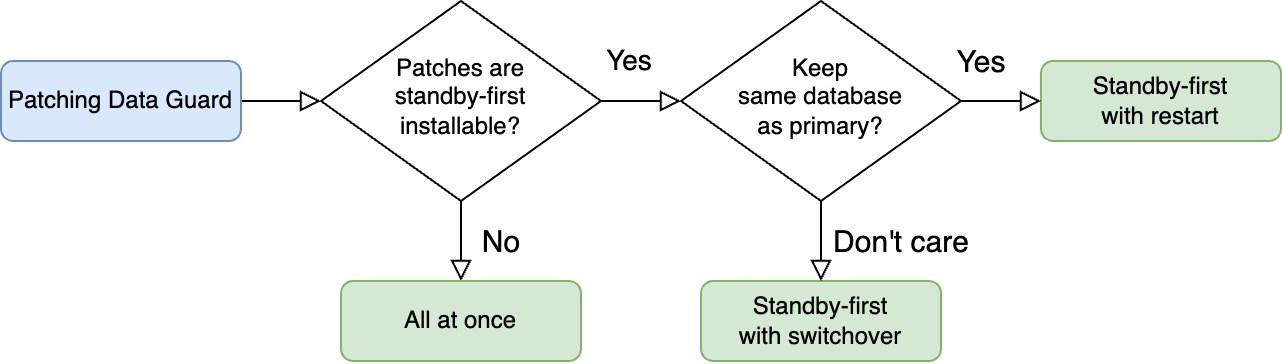
Here’s a decision tree you can use to find the method that suits you.

Decision tree showing which method to choose

What If

RAC

These blog posts focus on single instance configuration.

Conceptually, patching Data Guard with RAC databases is the same; you can’t use the step-by-step guides in this blog post series. Further, AutoUpgrade doesn’t support all methods of patching RAC databases (yet).

I suggest that you take a look at these blog posts instead:

Or even better, use Oracle Fleet Patching and Provisioning.

Oracle Restart

You can use these blog posts if you’re using Oracle Restart. You can even combine patching Oracle Restart and Oracle Database into one operation using standby-first with restart.

We’re Really Sensitive To Downtime?

In these blog posts, I choose the easy way – and that’s using AutoUpgrade. It automates many of the steps for me and has built-in safeguards to ensure things don’t go south.

But this convenience comes at a price: sligthly longer outage. Partly, because AutoUpgrade doesn’t finish a job before all post-upgrade tasks are done (like Datapatch and gathering dictionary stats).

If you’re really concerned about downtime, you might be better off with your own automation, where you can open the database for business as quickly as possible while you run Datapatch and other post-patching activities in the background.

Datapatch

Just a few words about patching Data Guard and Datapatch.

  • You always run Datapatch on the primary.
  • You run Datapatch just once, and the changes to the data dictionary propagates to the standby via redo.
  • You run Datapatch when all databases are running out of the new Oracle home or when redo transport is turned off. The important part is that the standby that applies the Datapatch redo must be on the same patch level as the primary.

Happy patching

Appendix

Standby-First Installable

You can only perform standby-first patch apply if all the patches are marked as standby-first installable.

Standby-first patch apply is when you patch the standby database first, and you don’t disable redo transport/apply.

You can only use standby-first patch apply if all the patches are classified as standby-first installable. For each of the patches, you must:

  • Examine the patch readme file.
  • One of the first lines will tell if this specific patch is standby-first installable. It typically reads: > This patch is Data Guard Standby-First Installable

Release Updates are always standby-first installable, and so are most of the patches for Oracle Database.

In rare cases, you find a non-standby-first installable patch, so you must patch Data Guard using all at once.

Other Blog Posts in the Series

How To Patch Oracle Data Guard Using AutoUpgrade And Standby-First Patch Apply With Switchover

Let me show you how I patch my Oracle Data Guard configuration. I make it as easy as possible using Oracle AutoUpgrade. I reduce the interruption by doing standby-first patch apply with a switchover.

  • My Data Guard configuration consists of two databases:
    • SID: SALES
    • Databases: SALES_COPENHAGEN and SALES_AARHUS
    • Hosts: copenhagen and aarhus
    • Primary database: SALES_COPENHAGEN running on copenhagen

Preparations

You should do these preparations in advance of your maintenance window. They don’t interupt operations on your databases.

  • I download the patches using AutoUpgrade.

    • Create a config file called sales-download.cfg:

      global.global_log_dir=/home/oracle/autoupgrade-patching/download
      global.keystore=/home/oracle/autoupgrade-patching/keystore
      patch1.folder=/home/oracle/autoupgrade-patching/patch
      patch1.patch=RECOMMENDED,MRP
      patch1.target_version=19
      patch1.platform=linux.x64
      
    • Start AutoUpgrade in download mode:

      java -jar autoupgrade.jar -config sales-download.cfg -patch -mode download
      
      • I can download the patches from any computer. It doesn’t have to be one of the database hosts, which typically don’t have internet access.
  • I verify all patches are standby-first installable and my configuration meets the requirements for standby-first patch apply.

  • I create a new Oracle home on all hosts.

    • Create a config file called sales.cfg:
      global.global_log_dir=/home/oracle/autoupgrade-patching/sales
      patch1.source_home=/u01/app/oracle/product/19.3.0.0/dbhome_1
      patch1.target_home=/u01/app/oracle/product/19/dbhome_19_26_0
      patch1.sid=SALES
      patch1.folder=/home/oracle/autoupgrade-patching/patch
      patch1.patch=RECOMMENDED,MRP
      patch1.download=no
      
      • Start AutoUpgrade in create_home mode:
      java -jar autoupgrade.jar -config sales.cfg -patch -mode create_home
      
      • AutoUpgrade also runs root.sh. It requires either:
        • oracle user has sudo privileges
        • Or I’ve stored the root credentials in the AutoUpgrade keystore
        • Else, I must manually execute root.sh.
  • Optionally, but recommended, I run an analysis on the primary database:

    [oracle@copenhagen] java -jar autoupgrade.jar -config sales.cfg -patch -mode analyze
    
    • Check the findings in the summary report.

Patching

Proceed with the following when your maintenance window starts.

  • Update listener.ora on the standby host (see appendix). I change the ORACLE_HOME parameter in the static listener entry (suffixed _DGMGRL) so it matches my target Oracle home.

  • I reload the listener:

    [oracle@aarhus] lsnrctl reload
    
  • Patch the standby database:

    [oracle@aarhus] java -jar autoupgrade.jar -config sales.cfg -mode deploy
    
    • I don’t disable redo transport/apply.
  • Optionally, test the application of patches using a snapshot standby database.

  • interruption starts!

  • Switch over to SALES_AARHUS:

    DGMGRL> switchover to sales_aarhus;
    
    • Perform draining in advance according to your practices.
    • Depending on how your application is configured, the users will experience this interruption as a brown-out or downtime.
  • Update listener.ora on the new standby host (copenhagen). I change the ORACLE_HOME parameter in the static listener entry (suffixed _DGMGRL) so it matches my target Oracle home.

  • I reload the listener:

    [oracle@copenhagen] lsnrctl reload
    
  • Patch the new standby database (see appendix):

    [oracle@copenhagen] java -jar autoupgrade.jar -config sales.cfg -mode deploy
    
  • Verify the Data Guard configuration and ensure the standby database is receiving and applying redo:

    DGMGRL> show database SALES_COPENHAGEN;
    DGMGRL> show database SALES_AARHUS;
    DGMGRL> validate database SALES_COPENHAGEN;
    DGMGRL> validate database SALES_AARHUS;
    

Post-Patching

  • Connect to the new primary database and execute Datapatch. You do that by calling AutoUpgrade in upgrade mode:
    [oracle@aarhus] java -jar autoupgrade.jar -config sales.cfg -mode upgrade
    

Happy Patching!

Appendix

Static Listener Entry

In this blog post, I update the static listener entries required by Data Guard broker (suffixed DGMGRL). My demo environment doesn’t use Oracle Restart or Oracle Grid Infrastructure, so this entry is mandatory.

If you use Oracle Restart or Oracle Grid Infrastructure, such entry is no longer needed.

Further Reading

Other Blog Posts in the Series

Avoid Problems on the Primary Database by Testing on a Snapshot Standby

One of the advantages of standby-first patch apply, is that I can test the patches in a production-like environment (the standby) before applying them to the primary. Should I find any issues with the patches, I can stop the process and avoid impacting the primary database.

Here’s an overview of the process.

For demo purposes, my Data Guard configuration consists of two databases:

  • SID: SALES
  • Databases: SALES_COPENHAGEN and SALES_AARHUS
  • Hosts: copenhagen and aarhus
  • Primary database: SALES_COPENHAGEN running on copenhagen

How To

This procedure starts right after I’ve patched the standby (SALES_AARHUS). It runs out of the target Oracle home, whereas the primary database (SALES_COPENHAGEN) still runs on the source Oracle home.

  • Convert the patched standby to a snapshot standby:

    DGMGRL> convert database SALES_AARHUS to snapshot standby;
    
  • Test the patch apply by running Datapatch on the standby:

    [oracle@aarhus] $ORACLE_HOME/OPatch/datapatch
    
    • One always runs Datapatch on the primary database and the changes made by the patches goes into redo to the standby.
    • But, since I converted to a snapshot standby, it is now opened like a normal database and I can run Datapatch on it.
    • If Datapatch completes without problems on the standby, I can be pretty sure it will do so on the primary as well. The standby is after all an exact copy of the primary database.
  • Optionally, perform additional testing on the standby.

    • I can connect any application and perform additional tests.
    • I can use SQL Performance Analyzer to check for regressing SQL statements.
    • I can make changes to any data in the standby. It is protected by a restore point.
  • When done, convert the snapshot standby back to a physical standby:

    DGMGRL> convert database SALES_AARHUS to physical standby;
    
    • This implicitly shuts down the standby, flashes back to the restore point and re-opens the database as a physical standby.
    • All changes made when it was a snapshot standby, including the Datapatch run, are undone.

Continue the patching procedure on the primary database as described elsewhere.

Is It Safe?

Sometimes, when I suggest using the standby for testing, people are like: Huh! Seriously?

What Happens If I Need to Switch Over or Fail Over?

I can still perform a switchover or a failover. However, they will take a little bit longer.

When I convert to snapshot standby:

  • Redo transport is still active.
  • Redo apply is turned off.

So, the standby receives all redo from the primary but doesn’t apply it. Since you normally test for 10-20 minutes, this would be the maximum apply lag. On a well-oiled standby, it shouldn’t take more than a minute or two to catch up.

When performing a switchover or failover on a snapshot standby, you should expect an increase with the time it takes to:

  • Shut down
  • Flashback
  • Apply redo

I’d be surprised if that would be more than 5 minutes. If your RTO doesn’t allow for a longer period:

  • Get a second standby.
  • Consider the reduction in risk you get when you test on the standby. Perhaps a short increase in RTO could be allowed after all.

What Happens If Datapatch Fails

If Datapatch fails on my snapshot standby, I should be proud of myself. I just prevented the same problem from hitting production.

  • I grab all the diagnostic information I need, so I can work with Oracle Support on the issue.
  • Convert back to physical standby, which will undo the failed Datapatch run.
  • If I expect to solve the issue quickly, leave the standby running in the target Oracle home. Otherwise, put it back into the source Oracle home.

So, yes, it’s safe to use!

Happy testing

Appendix

Other Blog Posts in the Series

How To Patch Oracle Data Guard Using AutoUpgrade For Non-Standby-First Installable Patches

Let me show you how I patch my Oracle Data Guard configuration. I make it easy using Oracle AutoUpgrade. I patch all at once – all databases at the same time – which means a short downtime. I can use this approach for all patches – even those that are not standby-first installable.

I recommend this approach only when you have patches that are not standby-first installable.

  • My Data Guard configuration consists of two databases:
    • SID: SALES
    • Databases: SALES_COPENHAGEN and SALES_AARHUS
    • Hosts: copenhagen and aarhus
    • Primary database: SALES_COPENHAGEN running on copenhagen

Preparations

You should do these preparations in advance of your maintenance window. They don’t interupt operations on your databases.

  • I download the patches using AutoUpgrade.

    • Create a config file called sales-download.cfg:

      global.global_log_dir=/home/oracle/autoupgrade-patching/download
      global.keystore=/home/oracle/autoupgrade-patching/keystore
      patch1.folder=/home/oracle/autoupgrade-patching/patch
      patch1.patch=RECOMMENDED,MRP
      patch1.target_version=19
      patch1.platform=linux.x64
      
    • Start AutoUpgrade in download mode:

      java -jar autoupgrade.jar -config sales-download.cfg -patch -mode download
      
      • I can download the patches from any computer. It doesn’t have to be one of the database hosts, which typically don’t have internet access.
  • I create a new Oracle home on all hosts.

    • Create a config file called sales.cfg:
      global.global_log_dir=/home/oracle/autoupgrade-patching/sales
      patch1.source_home=/u01/app/oracle/product/19.3.0.0/dbhome_1
      patch1.target_home=/u01/app/oracle/product/19/dbhome_19_26_0
      patch1.sid=SALES
      patch1.folder=/home/oracle/autoupgrade-patching/patch
      patch1.patch=RECOMMENDED,MRP
      patch1.download=no
      
      • Start AutoUpgrade in create_home mode:
      java -jar autoupgrade.jar -config sales.cfg -patch -mode create_home
      
      • AutoUpgrade also runs root.sh. It requires either:
        • oracle user has sudo privileges
        • Else, I must manually execute root.sh.
  • Optionally, but recommended, I run an analysis on the primary database:

    [oracle@copenhagen] java -jar autoupgrade.jar -config sales.cfg -patch -mode analyze
    
    • Check the findings in the summary report.

Patching

Proceed with the following when your maintenance window starts.

  • I connect to the primary database using Data Guard broker and disable redo transport from the primary database:

    DGMGRL> edit database sales_copenhagen set state='TRANSPORT-OFF';
    
  • I update listener.ora on both hosts (see appendix). I change the ORACLE_HOME parameter in the static listener entry (suffixed _DGMGRL) so it matches my target Oracle home.

  • I reload the listener on both hosts:

    lsnrctl reload
    
  • Downtime starts!

    • Perform draining in advance according to your practices.
    • Shut down your application.
  • Patch the primary database:

    [oracle@copenhagen] java -jar autoupgrade.jar -config sales.cfg -patch -mode deploy
    
  • Simultaneously, I patch the standby database:

    [oracle@aarhus] java -jar autoupgrade.jar -config sales.cfg -mode deploy
    
  • I update my profile and scripts so they point to the target Oracle home.

  • When patching completes in both hosts, I re-enable redo transport:

    DGMGRL> edit database sales_copenhagen set state='TRANSPORT-ON';
    
  • Verify the Data Guard configuration and ensure the standby database is receiving and applying redo:

    DGMGRL> show database SALES_COPENHAGEN;
    DGMGRL> show database SALES_AARHUS;
    DGMGRL> validate database SALES_COPENHAGEN;
    DGMGRL> validate database SALES_AARHUS;
    

That’s it.

Happy Patching!

Appendix

Static Listener Entry

In this blog post, I update the static listener entries required by Data Guard broker (suffixed DGMGRL). My demo environment doesn’t use Oracle Restart or Oracle Grid Infrastructure, so this entry is mandatory.

If you use Oracle Restart or Oracle Grid Infrastructure, such entry is no longer needed.

Further Reading

Other Blog Posts in the Series

How To Patch Oracle Data Guard Using AutoUpgrade And Standby-First Patch Apply With Restart

Let me show you how I patch my Oracle Data Guard configuration. I make it as easy as possible using Oracle AutoUpgrade. I reduce the interuption by doing standby-first patch apply with a primary database restart.

  • My Data Guard configuration consists of two databases:
    • SID: SALES
    • Databases: SALES_COPENHAGEN and SALES_AARHUS
    • Hosts: copenhagen and aarhus
    • Primary database: SALES_COPENHAGEN running on copenhagen

Preparations

You should do these preparations in advance of your maintenance window. They don’t interupt operations on your databases.

  • I download the patches using AutoUpgrade.

    • Create a config file called sales-download.cfg:

      global.global_log_dir=/home/oracle/autoupgrade-patching/download
      global.keystore=/home/oracle/autoupgrade-patching/keystore
      patch1.folder=/home/oracle/autoupgrade-patching/patch
      patch1.patch=RECOMMENDED,MRP
      patch1.target_version=19
      patch1.platform=linux.x64
      
    • Start AutoUpgrade in download mode:

      java -jar autoupgrade.jar -config sales-download.cfg -patch -mode download
      
      • I can download the patches from any computer. It doesn’t have to be one of the database hosts, which typically don’t have internet access.
  • I verify all patches are standby-first installable and my configuration meets the requirements for standby-first patch apply.

  • I create a new Oracle home on all hosts.

    • Create a config file called sales.cfg:
      global.global_log_dir=/home/oracle/autoupgrade-patching/sales
      patch1.source_home=/u01/app/oracle/product/19.3.0.0/dbhome_1
      patch1.target_home=/u01/app/oracle/product/19/dbhome_19_26_0
      patch1.sid=SALES
      patch1.folder=/home/oracle/autoupgrade-patching/patch
      patch1.patch=RECOMMENDED,MRP
      patch1.download=no
      
      • Start AutoUpgrade in create_home mode:
      java -jar autoupgrade.jar -config sales.cfg -patch -mode create_home
      
      • AutoUpgrade also runs root.sh. It requires either:
        • oracle user has sudo privileges
        • Or I’ve stored the root credentials in the AutoUpgrade keystore
        • Else, I must manually execute root.sh.
  • Optionally, but recommended, I run an analysis on the primary database:

    [oracle@copenhagen] java -jar autoupgrade.jar -config sales.cfg -patch -mode analyze
    
    • Check the findings in the summary report.

Patching

Proceed with the following when your maintenance window starts.

  • Update listener.ora on the standby host (see appendix). I change the ORACLE_HOME parameter in the static listener entry (suffixed _DGMGRL) so it matches my target Oracle home.

  • I reload the listener:

    [oracle@aarhus] lsnrctl reload
    
  • Patch the standby database:

    [oracle@aarhus] java -jar autoupgrade.jar -config sales.cfg -mode deploy
    
    • I don’t disable redo transport/apply.
  • Optionally, test the application of patches using a snapshot standby database.

  • Downtime starts!

    • Perform draining in advance according to your practices.
    • Shut down your application.
  • Update listener.ora on the primary host (see appendix). I change the ORACLE_HOME parameter in the static listener entry (suffixed _DGMGRL) so it matches my target Oracle home.

  • I reload the listener:

    [oracle@copenhagen] lsnrctl reload
    
  • Patch the primary database (see appendix):

    [oracle@copenhagen] java -jar autoupgrade.jar -config sales.cfg -patch -mode deploy
    
    • I use the sales.cfg config file.
    • AutoUpgrade detects it’s running against the primary database, and executes Datapatch and all the post-upgrade tasks.
  • Verify the Data Guard configuration and ensure the standby database is receiving and applying redo:

    DGMGRL> show database SALES_COPENHAGEN;
    DGMGRL> show database SALES_AARHUS;
    DGMGRL> validate database SALES_COPENHAGEN;
    DGMGRL> validate database SALES_AARHUS;
    

That’s it.

Happy Patching!

Appendix

Static Listener Entry

In this blog post, I update the static listener entries required by Data Guard broker (suffixed DGMGRL). My demo environment doesn’t use Oracle Restart or Oracle Grid Infrastructure, so this entry is mandatory.

If you use Oracle Restart or Oracle Grid Infrastructure, such entry is no longer needed.

Further Reading

Other Blog Posts in the Series