Real-World Database Upgrade and Migration 19c and 23c

Mike Dietrich and I are hosting two in-person workshops in Sweden and Denmark in early May. Yes, that’s right: It’s in-person.

Mike Dietrich and Daniel Overby Hansen will guide you through several different examples of upgrade, migration and consolidation techniques and strategies – shown with real world customer cases.

  • How to take full advantage of the new features and options in Oracle Database 19c and 23c
  • The smoothest and fully unattended migration to the CDB architecture
  • Real World Best Practices and Customer Cases
  • Performance Stability Prescription
  • What’s new, what’s coming (especially for DBAs) in Oracle Database 23c

Oracle Real-World Database Upgrade and Migration 19c and 23c with Mike Dietrich and Daniel Overby Hansen

Sweden

  • Oracle office, Solna
  • Tuesday 7 May 2024, 09:00 – 16:30
  • Sign up

Denmark

  • Oracle office, Hellerup
  • Wednesday 8 May 2024, 08:00 – 15:00
  • Sign up

Secure your seat as quickly as possible. Seats are limited!

Agenda

To whet your appetite, here is the agenda:

Agenda
Release Strategy with Oracle Database 23c
Oracle Database Patching – Welcome to the Jungle
Upgrade to Oracle Database 23c
Migration to the CDB architecture – smoothly and unattended
Data Pump: The universal tool, for ADB migrations and more
Cloud Migration Advisor
Performance Stability Prescription
Secret underscores
Insights into the Oracle Database Development process
Oracle Database 23c – What’s new, what’s coming

Remember our mantra: All tech, no marketing!

I hope to see you at our workshops.

A Different Day at the Office

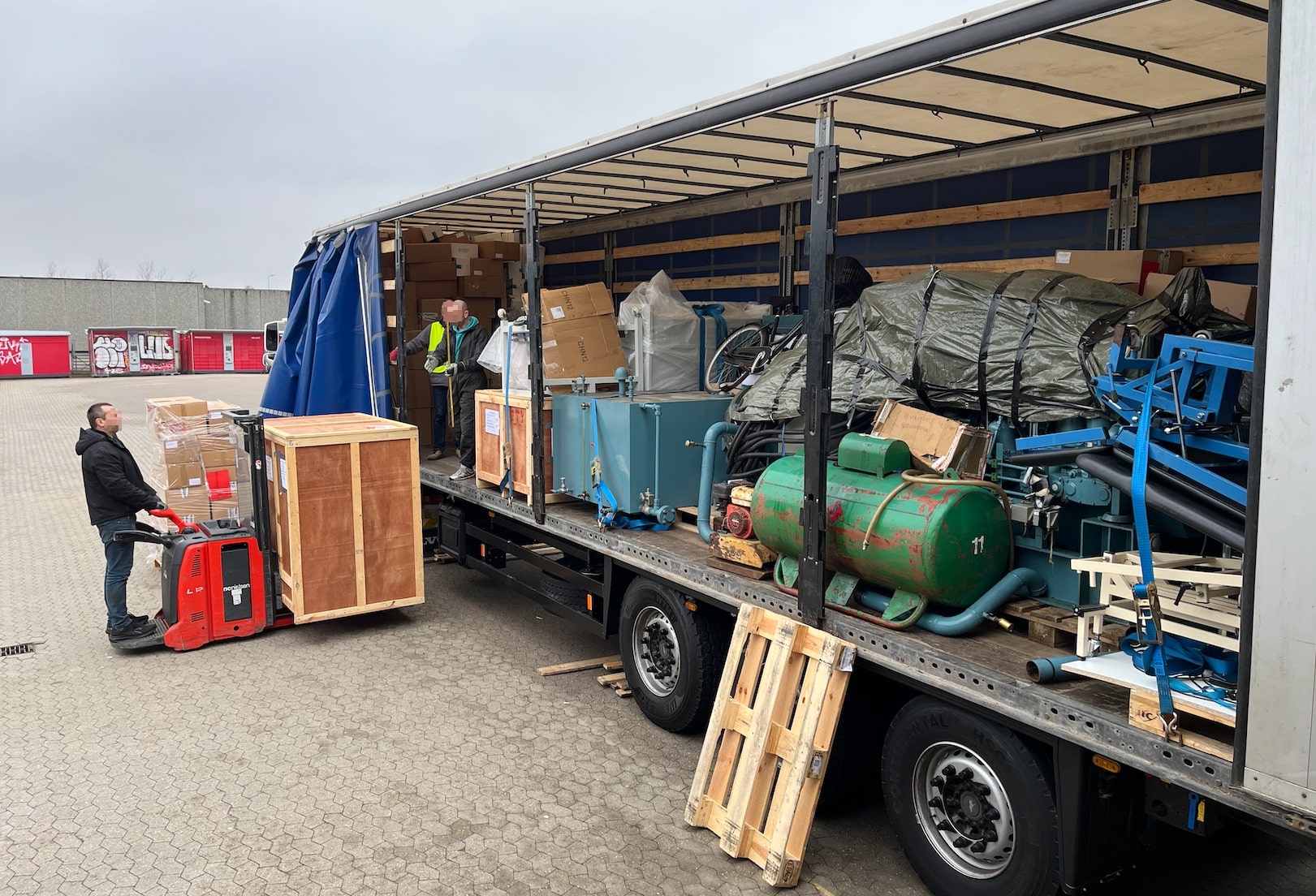
Yesterday, I had quite a different day at the office. Instead of typing on the keyboard, I spent the day loading a truck bound for Ukraine with humanitarian aid.

I had a fantastic day with the volunteers at Bevar Ukraine and colleagues from Oracle. We loaded a truck with:

  • 50 kW diesel generator
  • Medical supplies
  • Hospital beds
  • Clothes
  • Other necessities

Loading a truck at Bevar Ukraine with humanitarian aid

Bevar Ukraine

What is Bevar Ukraine?

Bevar Ukraine is an independent Danish humanitarian non-profit organization whose purpose is to provide humanitarian aid in Ukraine and to support refugees. The organization works to combat poverty and strengthen civil society. Bevar Ukraine supports the UN’s global goals for sustainable development.

It is run by volunteers who spend much time and effort helping the victims in Ukraine.

I am glad I could spend a day with these wonderful people and help them in their mission. It was touching to listen to their stories. Thank you, Bevar Ukraine!

I encourage you to donate to their organization and help those in need.

Oracle Volunteering

As an employee of Oracle, I can spend my work time on voluntary work. We call this Oracle Volunteering:

Oracle Volunteers lead and participate in virtual and in-person projects with hundreds of nonprofits and public institutions year-round. They support students and educators, protect nature and wildlife, and strengthen communities by helping people in need.

Every year, I can spend a whole week on voluntary work. I feel proud of my employer when they take action and help make the world a better place. Thank you, Oracle!

Reflections

I am grateful to live in a peaceful part of the world. But I feel for those less fortunate. We could do much more together if we all made friends.

In my previous job, I worked together with many Ukrainians. They were all young and eager to sharpen their skills in software development. They worked hard to make a good living for themselves and Ukraine.

Now, much of that is lost due to the unjust occupation and war. Perhaps some of my former colleagues are now dead because they defended their country. How tragic…

Stop the war and free Ukraine!

Does Data Pump Export Advanced Data Optimization Policies and Heat Maps?

During our recent webinar on cross-platform migration, an attendee asked a good question:

Does Data Pump in a Full Transportable Export/Import move ADO policies and heat map information?

Let’s find out.

What Is It?

ADO means Advanced Data Optimization and is a feature that:

… automate the compression and movement of data between different tiers of storage within the database.

ADO uses heat maps that :

… provides data access tracking at the segment-level and data modification tracking at the segment and row level.

In other words,

  • You might have slower and faster storage.
  • You define ADO policies on tables and indexes (including partitions and subpartitions).
  • The policies define in which storage the database stores the rows.
  • The heat maps tell which objects you access.
  • Based on heat maps, a job automatically moves rows between storage depending on the use and/or compress it.

What Happens in Data Pump

There are three pieces of essential information:

  1. ADO policies. Defined on objects and governs how the database should store data.
  2. Heat map information. The database records your usage of the data and stores the information in heat maps. Later on, the database uses the heat maps to determine what to do with your data.
  3. ILM settings. Tells the database how to perform the ILM (Information Lifecycle Management) maintenance. For example, you can define the parallel degree that the database uses during maintenance or the number of concurrent maintenance jobs.

You can find a test case at the end of the blog post. I’m using test data and queries from oracle-base.com.

ADO Policies

Data Pump transfers the ADO policies in all modes:

  • Full transportable
  • Full
  • Schema
  • Tablespace
  • Table

You can verify it:

SELECT   policy_name,
         object_owner,
         object_name,
         object_type,
         inherited_from,
         enabled,
         deleted
FROM     dba_ilmobjects
ORDER BY 1;

Heat Map Information

Data Pump does not transfer any heat map information. I didn’t find any way to move the heat map information to the new database.

ILM Settings

Data Pump does not transfer ILM settings – not even in full modes. You must manually move the settings.

  • You can find the current ILM settings:

    SELECT * FROM DBA_ILMPARAMETERS;
    
  • And change the settings in the target database:

    EXEC DBMS_ILM_ADMIN.CUSTOMIZE_ILM(DBMS_ILM_ADMIN.DEG_PARALLEL , 4);
    
    • You must translate the name of the setting to the corresponding PL/SQL constant. You change the setting DEGREE OF PARALLELISM by using DBMS_ILM_ADMIN.DEG_PARALLEL.
  • The documentation holds a complete list of ILM settings.

Appendix

Further Reading

Test Data

I am using our Hands-On lab that you can use on Oracle LiveLabs. Again, thanks to oracle-base.com for test data and queries.

CONN / AS SYSDBA
--Turn on heat map tracking
ALTER SYSTEM SET HEAT_MAP=ON SCOPE=BOTH;

--Customize ILM settings
BEGIN
  DBMS_ILM_ADMIN.CUSTOMIZE_ILM(DBMS_ILM_ADMIN.RETENTION_TIME, 42);
  DBMS_ILM_ADMIN.CUSTOMIZE_ILM(DBMS_ILM_ADMIN.JOBLIMIT, 42);
  DBMS_ILM_ADMIN.CUSTOMIZE_ILM(DBMS_ILM_ADMIN.ABS_JOBLIMIT, 42);
  DBMS_ILM_ADMIN.CUSTOMIZE_ILM(DBMS_ILM_ADMIN.DEG_PARALLEL , 4);
END;
/
SELECT * FROM DBA_ILMPARAMETERS;

--Create tablespaces for ILM policy
CREATE TABLESPACE FAST_STORAGE_TS DATAFILE SIZE 1M AUTOEXTEND ON NEXT 1M;
CREATE TABLESPACE MEDIUM_STORAGE_TS DATAFILE SIZE 1M AUTOEXTEND ON NEXT 1M;
CREATE TABLESPACE SLOW_STORAGE_TS DATAFILE SIZE 1M AUTOEXTEND ON NEXT 1M;
CREATE USER TEST IDENTIFIED BY TEST QUOTA UNLIMITED ON USERS;
GRANT CREATE SESSION, CREATE TABLE TO TEST;
ALTER USER TEST QUOTA UNLIMITED ON FAST_STORAGE_TS;
ALTER USER TEST QUOTA UNLIMITED ON MEDIUM_STORAGE_TS;
ALTER USER TEST QUOTA UNLIMITED ON SLOW_STORAGE_TS;

CONN TEST/TEST

--Create table where we can track usage
CREATE TABLE t1 (
  id          NUMBER,
  description VARCHAR2(50),
  CONSTRAINT t1_pk PRIMARY KEY (id)
);
INSERT INTO t1
SELECT level,
       'Description for ' || level
FROM   dual
CONNECT BY level <= 10;
COMMIT;

--Generate "usage"
SELECT *
FROM   t1;
SELECT *
FROM   t1
WHERE  id = 1;

--Create table for ILM policy
CREATE TABLE invoices (
  invoice_no    NUMBER NOT NULL,
  invoice_date  DATE   NOT NULL,
  comments      VARCHAR2(500)
)
PARTITION BY RANGE (invoice_date)
(
  PARTITION invoices_2016_q1 VALUES LESS THAN (TO_DATE('01/04/2016', 'DD/MM/YYYY')) TABLESPACE slow_storage_ts,
  PARTITION invoices_2016_q2 VALUES LESS THAN (TO_DATE('01/07/2016', 'DD/MM/YYYY')) TABLESPACE slow_storage_ts,
  PARTITION invoices_2016_q3 VALUES LESS THAN (TO_DATE('01/09/2016', 'DD/MM/YYYY')) TABLESPACE medium_storage_ts
    ILM ADD POLICY TIER TO slow_storage_ts READ ONLY SEGMENT AFTER 6 MONTHS OF NO ACCESS,
  PARTITION invoices_2016_q4 VALUES LESS THAN (TO_DATE('01/01/2017', 'DD/MM/YYYY')) TABLESPACE medium_storage_ts
    ILM ADD POLICY TIER TO slow_storage_ts READ ONLY SEGMENT AFTER 6 MONTHS OF NO ACCESS,
  PARTITION invoices_2017_q1 VALUES LESS THAN (TO_DATE('01/04/2017', 'DD/MM/YYYY')) TABLESPACE fast_storage_ts
    ILM ADD POLICY TIER TO medium_storage_ts READ ONLY SEGMENT AFTER 3 MONTHS OF NO ACCESS,
  PARTITION invoices_2017_q2 VALUES LESS THAN (TO_DATE('01/07/2017', 'DD/MM/YYYY')) TABLESPACE fast_storage_ts
    ILM ADD POLICY TIER TO medium_storage_ts READ ONLY SEGMENT AFTER 3 MONTHS OF NO ACCESS
)
ILM ADD POLICY ROW STORE COMPRESS BASIC SEGMENT AFTER 3 MONTHS OF NO ACCESS;

Test Case

###############
# FULL EXPORT #
###############

export ORAENV_ASK=NO
export ORACLE_SID=UP19
. oraenv
export ORAENV_ASK=YES
rm /tmp/expdat.dmp
sql / as sysdba<<EOF
   create or replace directory expdir as '/tmp';
EOF
expdp system/oracle full=y directory=expdir job_name=fullexp

export ORAENV_ASK=NO
export ORACLE_SID=CDB2
. oraenv
export ORAENV_ASK=YES
sql / as sysdba<<EOF
    startup
    alter pluggable database pdb1 close immediate;
    drop pluggable database pdb1 including datafiles;
    create pluggable database pdb1 admin user admin identified by admin;
    alter pluggable database all open;
    alter session set container=pdb1;
    create tablespace users DATAFILE SIZE 1M AUTOEXTEND ON NEXT 1M;
    CREATE TABLESPACE fast_storage_ts DATAFILE SIZE 1M AUTOEXTEND ON NEXT 1M;
    CREATE TABLESPACE medium_storage_ts DATAFILE SIZE 1M AUTOEXTEND ON NEXT 1M;
    CREATE TABLESPACE slow_storage_ts DATAFILE SIZE 1M AUTOEXTEND ON NEXT 1M;
    create or replace directory expdir as '/tmp';
EOF

impdp system/oracle@pdb1 directory=expdir

sql / as sysdba<<EOF
    alter session set container=pdb1;
    select * from DBA_ILMPARAMETERS;
    SELECT policy_name,
       object_owner,
       object_name,
       object_type,
       inherited_from,
       enabled,
       deleted
    FROM   dba_ilmobjects
    ORDER BY 1;
    SELECT track_time,
        owner,
        object_name,
        segment_write,
        full_scan,
        lookup_scan
    FROM   dba_heat_map_seg_histogram
    ORDER BY 1, 2, 3;
EOF

#################
# SCHEMA EXPORT #
#################

export ORAENV_ASK=NO
export ORACLE_SID=UP19
. oraenv
export ORAENV_ASK=YES
rm /tmp/expdat.dmp
sql / as sysdba<<EOF
   create or replace directory expdir as '/tmp';
EOF
expdp system/oracle schemas=test directory=expdir job_name=schemaexp

export ORAENV_ASK=NO
export ORACLE_SID=CDB2
. oraenv
export ORAENV_ASK=YES
sql / as sysdba<<EOF
    startup
    alter pluggable database pdb1 close immediate;
    drop pluggable database pdb1 including datafiles;
    create pluggable database pdb1 admin user admin identified by admin;
    alter pluggable database all open;
    alter session set container=pdb1;
    create tablespace users DATAFILE SIZE 1M AUTOEXTEND ON NEXT 1M;
    CREATE TABLESPACE fast_storage_ts DATAFILE SIZE 1M AUTOEXTEND ON NEXT 1M;
    CREATE TABLESPACE medium_storage_ts DATAFILE SIZE 1M AUTOEXTEND ON NEXT 1M;
    CREATE TABLESPACE slow_storage_ts DATAFILE SIZE 1M AUTOEXTEND ON NEXT 1M;
    create or replace directory expdir as '/tmp';
EOF

impdp system/oracle@pdb1 directory=expdir

sql / as sysdba<<EOF
    alter session set container=pdb1;
    select * from DBA_ILMPARAMETERS;
    SELECT policy_name,
       object_owner,
       object_name,
       object_type,
       inherited_from,
       enabled,
       deleted
    FROM   dba_ilmobjects
    ORDER BY 1;
    SELECT track_time,
        owner,
        object_name,
        segment_write,
        full_scan,
        lookup_scan
    FROM   dba_heat_map_seg_histogram
    ORDER BY 1, 2, 3;
EOF

################
# TABLE EXPORT #
################

export ORAENV_ASK=NO
export ORACLE_SID=UP19
. oraenv
export ORAENV_ASK=YES
rm /tmp/expdat.dmp
sql / as sysdba<<EOF
   create or replace directory expdir as '/tmp';
EOF
expdp system/oracle tables=test.t1,test.invoices directory=expdir job_name=tabexp

export ORAENV_ASK=NO
export ORACLE_SID=CDB2
. oraenv
export ORAENV_ASK=YES
sql / as sysdba<<EOF
    startup
    alter pluggable database pdb1 close immediate;
    drop pluggable database pdb1 including datafiles;
    create pluggable database pdb1 admin user admin identified by admin;
    alter pluggable database all open;
    alter session set container=pdb1;
    create tablespace users DATAFILE SIZE 1M AUTOEXTEND ON NEXT 1M;
    CREATE TABLESPACE fast_storage_ts DATAFILE SIZE 1M AUTOEXTEND ON NEXT 1M;
    CREATE TABLESPACE medium_storage_ts DATAFILE SIZE 1M AUTOEXTEND ON NEXT 1M;
    CREATE TABLESPACE slow_storage_ts DATAFILE SIZE 1M AUTOEXTEND ON NEXT 1M;
    create or replace directory expdir as '/tmp';
    CREATE USER TEST IDENTIFIED BY TEST QUOTA UNLIMITED ON USERS;
    GRANT CREATE SESSION, CREATE TABLE TO TEST;
    ALTER USER TEST QUOTA UNLIMITED ON FAST_STORAGE_TS;
    ALTER USER TEST QUOTA UNLIMITED ON MEDIUM_STORAGE_TS;
    ALTER USER TEST QUOTA UNLIMITED ON SLOW_STORAGE_TS;
EOF

impdp system/oracle@pdb1 directory=expdir

sql / as sysdba<<EOF
    alter session set container=pdb1;
    select * from DBA_ILMPARAMETERS;
    SELECT policy_name,
       object_owner,
       object_name,
       object_type,
       inherited_from,
       enabled,
       deleted
    FROM   dba_ilmobjects
    ORDER BY 1;
    SELECT track_time,
        owner,
        object_name,
        segment_write,
        full_scan,
        lookup_scan
    FROM   dba_heat_map_seg_histogram
    ORDER BY 1, 2, 3;
EOF

How to Detect and Repair Corruption in Your Oracle Database

Over time, corruptions can sneak into your Oracle Database. Such corruptions may surface at the most inconvenient times, like upgrades, migrations, or PDB conversions. Here is a quick way of checking your Oracle Database and increasing your chance of success.

Oracle Database Dictionary Check

The documentation states:

DBMS_DICTIONARY_CHECK is a read-only and lightweight PL/SQL package procedure that helps you identify Oracle Database dictionary inconsistencies that are manifested in unexpected entries in the Oracle Database dictionary tables or invalid references between dictionary tables. Oracle Database dictionary inconsistencies can cause process failures and, in some cases, instance crash.

How to Execute a Dictionary Check

  • First, the database must be on Oracle Database 19.22.0 or higher.
  • Start the check:
    set serverout on
    exec dbms_dictionary_check.full;
    
  • The database spools to the console and a trace file:
    dbms_dictionary_check on 02-MAR-2024 13:31:56
    ----------------------------------------------
    Catalog Version 19.0.0.0.0 (1900000000)
    db_name: UP19
    Is CDB?: NO
    Trace File:
    /u01/app/oracle/diag/rdbms/up19/UP19/trace/UP19_ora_3343_DICTCHECK.trc
    
                                    Catalog       Fixed
    Procedure Name                  Version    Vs Release    Timestamp      Result
    --------------------------- ... ---------- -- ---------- -------------- ------
    .- OIDOnObjCol		       ... 1900000000 <=  *All Rel* 03/02 13:31:56 PASS
    .- LobNotInObj		       ... 1900000000 <=  *All Rel* 03/02 13:31:56 PASS
    .- SourceNotInObj	       ... 1900000000 <=  *All Rel* 03/02 13:31:56 PASS
    
    ...
    
    .- LobSeg                   ... 1900000000 <=  *All Rel* 03/02 13:31:56 PASS
    ---------------------------------------
    02-MAR-2024 13:31:56  Elapsed: 0 secs
    ---------------------------------------
    Found 0 potential problem(s) and 0 warning(s)
    Trace File:
    /u01/app/oracle/diag/rdbms/up19/UP19/trace/UP19_ora_3343_DICTCHECK.trc
    
    PL/SQL procedure successfully completed.
    
    • In this case, all checks pass.
  • If there are any warnings or errors, you can find a detailed description of the check in the documentation.
  • In multitenant, you run the check in the root container and all PDBs. The PDBs are most important.
  • In Oracle Database 23ai, the full check even has a fix mode which can correct certain known issues.

Words of Advice

  • Run the check in due time before a major maintenance operation. Although many checks have a fix option, you sometimes need to engage with Oracle Support. This can take time, so don’t do it the day before an important upgrade.

  • AutoUpgrade makes your life easier. Of course, it can run the dictionary check for you. Add the following to your config file:

    <prefix>.run_dictionary_health=full
    

    During the pre-upgrade analysis, AutoUpgrade executes the dictionary check and stores the full report in the precheck folder in the AutoUpgrade log directory.

The Artist Formerly Known As

If you think: This does sound very similar to health check or hcheck.sql, then you are on to something. Oracle moved the health check code into the database. No need to separately download the script; it’s always there.

Weed out those corruptions!

It’s a Wrap – Transportable Tablespaces to the Extreme

Recently, we hosted our webinar Cross Platform Migration – Transportable Tablespaces to the Extreme. You can now watch the recording on our YouTube channel.

The audience at our webinar was very active and asked many good questions. To know all the details, you can read the Q&A and the slides.

Some of the attendees asked questions we were not able to answer during the webinar. Those questions – and answers – are included in the Q&A.

The New Procedure

For cross-platform and cross-endian migrations, we have a new procedure called M5. It replaces the former XTTS v4 Perl script that has been used for many migrations. We could see the need for changes as Oracle Databases world-wide grows in size and complexity. M5 implements the latest RMAN and Data Pump technology to deliver the fastest possible migrations.

You can download the M5 scripts and read the procedure on My Oracle Support (Doc ID 2999157.1).

Next Webinar

Mark your calendar for our next webinar:

Move to Oracle Database 23c – Everything you need to know about Oracle Multitenant

Oracle Database 23c does only support the CDB architecture. If you haven’t migrated to Oracle Multitenant yet, then you will be with your upgrade to 23c. How do you approach it in the most efficient way? What are the other options? And why is this a migration unless you have PDBs already? All this and way much more about how to work with Multitenant, how AutoUpgrade automates the entire move for you, end-to-end – and best practices and tips and tricks. We’ll guide you, and you will be ready to move to Oracle Database 23c right away

Sign up now and secure your seat.

All tech – no marketing!

Happy Migrating!

The Next-generation Cross-platform Migration for Oracle Database

I am very pleased to share that Oracle has officially launched a new method for cross-platform migrations of Oracle Database.

M5 Cross Endian Platform Migration using Full Transportable Data Pump Export/Import and RMAN Incremental Backups (Doc ID 2999157.1)

The M5 script is the next-generation cross-platform transportable tablespace migration procedure for Oracle Database

You can also use the script for cross-endian migrations, so this is perfect for AIX, HP-UX or SPARC migrations to Exadata Database Machine or any other little endian platform.

Next-generation

Before we launched M5, you would use the XTTS v4 Perl script for such migrations.

Timeline of methods for cross-endian migrations

We launched the latest version of the XTTS v4 Perl script many years ago. Over the last years, as databases grew bigger and bigger, we saw multiple issues with XTTS v4 Perl script, including:

  • No multisection backups for bigfile tablespaces
  • No encrypted tablespaces
  • Inefficient parallelism
  • Incomplete multitenant support

We wanted to solve all those issues with M5 – and we did! M5 uses newer RMAN functionality, and we made the procedure much simpler. It relies entirely on out-of-the-box RMAN functionality. On the source:

BACKUP ... TABLESPACE ... ;

On target we use:

RESTORE ALL FOREIGN DATAFILES ... ;

The latter command was introduced in Oracle Database 18c and enhanced in Oracle Database 19c. This means that the requirements for source and target database are:

Want to Know More?

We have a webinar later today about this new method. If you are interested, we still have open seats.

Cross Platform Migration – Transportable Tablespaces to the Extreme, February 22, 16:00 CET

Next week, we will add the recording to our YouTube channel. Be sure to subscribe so you don’t miss out on anything.

If you want a sneak peek at the slides, go ahead.

I have an elaborate blog post series about cross-platform migrations. I will soon update it with more information about the M5 migration method.

Happy Migrating!

Kickstart Learning in 2024

What better way to start the new year of the Dragon than to learn something new. If it sounds like a good idea, you’ll be pleased to know that we have two new webinars coming your way shortly.

Like the previous webinars, it’s all tech, no marketing!

Cross Platform Migration – Transportable Tablespaces to the Extreme

Recently, the team and I worked with two big customers who had to migrate cross-endian to Exadata. Both customers had huge and very active databases and needed to migrate with as little downtime as possible.

In this webinar, you can hear details on how one of the customers performed the migration using a new procedure developed by Oracle. In addition, we will share the lessons learned and our new best practices for such migrations.

> Transportable Tablespaces and Full Transportable Export Import aren’t a secret feature. But there are many things to take care on when you migrate cross-platform, and especially cross-Endianness. Today we will give you insights and show you how we worked together to migrate a 200TB database writing up to 15TB redo per day from Oracle SPARC SuperCluster to Oracle Exadata with a database downtime of less than 6 hours. Follow us into the extreme. Extreme load. Extreme complexity. And an extremely skilled team working toegther. Such projects aren’t done in 4 weeks. And we will tell you the entire story, from start to the nights of the nights.

Sign up here.

Move to Oracle Database 23c – Everything you need to know about Oracle Multitenant

Oracle Database 23c is on its way. Hopefully, it doesn’t come as a surprise to you that this release supports the multitenant architecture only. If you haven’t migrated your Oracle Database yet, you’ll need to do so as part of the upgrade to Oracle Database 23c.

This webinar shares all the things you need to know to migrate a database to the multitenant architecture successfully, including essential parts like Data Guard, backup, and your rollback plans.

> Oracle Database 23c does only support the CDB architecture. If you haven’t migrated to Oracle Multitenant yet, then you will be with your upgrade to 23c. How do you approach it in the most efficient way? What are the other options? And why is this a migration unless you have PDBs already? All this and way much more about how to work with Multitenant, how AutoUpgrade automates the entire move for you, end-to-end – and best practices and tips and tricks. We’ll guide you, and you will be ready to move to Oracle Database 23c right away

Sign up here.

Registration

The webinars are free, of course. You just need to sign up.

Our entire team will be present during the webinar to answer all your questions. I promise we won’t stop the webinar until we have answered all the questions. If you cannot participate, you can find the recording shortly after the webinar.

If you can’t wait, you can start learning already by watching the previous webinars.

Register your seat now.

How to Export and Import Statistics Faster Using DBMS_STATS in Parallel

When you migrate Oracle Database, you often need to transport statistics using DBMS_STATS. Also, during migrations, you want to minimize the downtime. How can you transfer statistics as quickly as possible?

Export and Import

The easiest solution is to use dbms_stats.export_database_stats and dbms_stats.import_database_stats. But, the procedures have no parallel capabilities. If you have an Oracle Database with many objects, it will take a long time.

Parallel Export and Import

dbms_stats also allows you to export and import statistics on schema or table level. You can use this to your advantage to run multiple export or import commands at the same time.

Imagine a database with four schemas.

If you export database stats, the database creates a list of statistics from all four schemas. Then, it exports them one by one.

  • Session 1: exec dbms_stats.export_database_stats( ... );

In contrast, if you start four different sessions, you can export one schema in each session and thus finish much faster.

  • Session 1: exec dbms_stats.export_schema_stats(ownname=>'SCHEMA1');
  • Session 2: exec dbms_stats.export_schema_stats(ownname=>'SCHEMA2');
  • Session 3: exec dbms_stats.export_schema_stats(ownname=>'SCHEMA3');
  • Session 4: exec dbms_stats.export_schema_stats(ownname=>'SCHEMA4');

Benchmark

This benchmark gives you an idea of how much time you can save.

It is an Oracle E-Business Suite (EBS) database with 1.400 schemas and 150.000 tables/indexes.

I compare exporting and importing statistics on database level and on schema level. For schema level, I divide the schemas into chunks and process them from separate sessions simultaneously.

Method Time to export Time to import Total
Database 4m 5s 21m 5s 25m 10s
Schema, parallel 8 57s 3m 58s 4m 55s
Schema, parallel 16 53s 3m 45s 4m 38s

I can save more than 20 minutes in this benchmark by doing the work in parallel. Between parallel 8 and parallel 16, there is not much to gain, probably because of contention.

How to Export and Import in Parallel Using DBMS_STATS

Here is some simple code you can use to export and import in parallel.

I haven’t coded for years, so use at your own risk :)

  1. Create a dedicated user for the statistics staging table and create a control table with the list of schemas to process.

    drop user statuser cascade;
    grant dba to statuser identified by statuser;
    alter user statuser quota unlimited on users;
    --Create the DBMS_STATS staging table
    exec dbms_stats.create_stat_table('STATUSER', 'DBSTATS', 'USERS');
    --Populate control table
    declare
       l_stmt VARCHAR2(1000);
       l_ctl_tab_name ALL_TABLES.TABLE_NAME%TYPE := 'DOH$STATXFERCTL';
       l_stat_tab_owner ALL_USERS.USERNAME%TYPE := 'STATUSER';
    begin
       --Create control table and populate it
       --Order schemas by how many tables they have
       l_stmt := 'CREATE TABLE ' || l_stat_tab_owner || '.' || l_ctl_tab_name; 
       l_stmt :=l_stmt || ' as select o.owner stat_id, count(o.table_name) as cnt, 0 exp_status, 0 imp_status from dba_tables o, dba_users u where u.username not in (''SYS'', ''SYSTEM'', ''' || l_stat_tab_owner || ''') and u.oracle_maintained=''N'' and o.owner=u.username group by owner order by 2 desc';
       execute immediate l_stmt;
    end;
    /
    
  2. Start any number of database sessions and run the code below in each. The code selects a schema from the control table and performs a schema-level export of statistics into the staging table.

    declare
       l_cur_stat_id ALL_USERS.USERNAME%TYPE;
       l_statown ALL_USERS.USERNAME%TYPE := 'STATUSER';
       l_stattab ALL_TABLES.TABLE_NAME%TYPE := 'DBSTATS';
       l_ctl_tab_name ALL_TABLES.TABLE_NAME%TYPE := 'DOH$STATXFERCTL';
       l_stmt VARCHAR2(1000);
    begin
       begin
          --Loop until you reach "no_data_found exception"
          while true loop
             --Select a schema from the control table
             --Order by count (cnt) to export largest schemas first
             --Select for update to ensure only one session process a schema
             l_stmt := 'select stat_id from ' || l_statown || '.' || l_ctl_tab_name || ' where exp_status = 0 and rownum=1 order by cnt desc for update';
             execute immediate l_stmt into l_cur_stat_id;
             
             --Mark the schemas as "in progress"
             --Commit to release lock on control table			
             l_stmt := 'update ' || l_statown || '.' || l_ctl_tab_name || ' set exp_status=1 where stat_id=:x1';
             execute immediate l_stmt using l_cur_stat_id;
             commit;
    
             --Perform the schema level export into DBMS_STATS staging table
             dbms_stats.export_schema_stats (ownname=>l_cur_stat_id, stattab=>l_stattab,statid=>l_cur_stat_id, statown=>l_statown);
    
             --Mark the schema as completed in the control table
             l_stmt := 'update ' || l_statown || '.' || l_ctl_tab_name || ' set exp_status=2 where stat_id=:x1';
             execute immediate l_stmt using l_cur_stat_id;
             commit;
          end loop;
       exception when no_data_found then
          --"No_data_found" exception occurs when there are no more rows/schemas to process	  
          null;
       end;
    end;
    /
    
  3. Now move the DBSTATS schema to the target database and run the import. Start any number of database sessions and run the code below in each. The code selects a schema from the control table and performs a schema-level import of statistics into the staging table.

    declare
       l_cur_stat_id ALL_USERS.USERNAME%TYPE;
       l_statown ALL_USERS.USERNAME%TYPE := 'STATUSER';
       l_stattab ALL_TABLES.TABLE_NAME%TYPE := 'DBSTATS';
       l_ctl_tab_name ALL_TABLES.TABLE_NAME%TYPE := 'DOH$STATXFERCTL';
       l_stmt VARCHAR2(1000);
       no_stats_imp EXCEPTION;
       PRAGMA EXCEPTION_INIT(no_stats_imp, -20000);
    begin
       begin
            --Loop until you reach "no_data_found exception"
          while true loop
             --Select a schema from the control table
             --Order by count (cnt) to import largest schemas first
             --Select for update to ensure only one session process a schema            l_stmt := 'select stat_id from ' || l_statown || '.' || l_ctl_tab_name || ' where imp_status = 0 and rownum=1 order by cnt desc for update';
             execute immediate l_stmt into l_cur_stat_id;
     		
             --Mark the schemas as "in progress"
             --Commit to release lock on control table					
             l_stmt := 'update ' || l_statown || '.' || l_ctl_tab_name || ' set imp_status=1 where stat_id=:x1';
             execute immediate l_stmt using l_cur_stat_id;
             commit;
    
             begin
                --Perform the schema level import into DBMS_STATS staging table	
                dbms_stats.import_schema_stats (ownname=>l_cur_stat_id, stattab=>l_stattab,statid=>l_cur_stat_id, statown=>l_statown);
             exception when no_stats_imp THEN
                --An empty schema, i.e., no tables or indexes			
                null;
             end;
     		
             --Mark the schema as completed in the control table             
             l_stmt := 'update ' || l_statown || '.' || l_ctl_tab_name || ' set imp_status=2 where stat_id=:x1';
             execute immediate l_stmt using l_cur_stat_id;
             commit;
          end loop;
       exception when no_data_found then
          --"No_data_found" exception occurs when there are no more rows/schemas to process	  	  
          null;
       end;
    end;
    /   
    

Does Exporting Database Statistics Include the Dictionary Statistics?

I recently worked on a migration of Oracle Database to a new platform. The customer was sensitive to downtime. We looked at each item in the migration run book and asked: “Can we make it faster?”

We discussed exporting database statistics, and the question: Does dbms_stats.export_database_stats include dictionary statistics?

The documentation states:

This procedure exports statistics for all objects in the database and stores them in the user statistics tables identified by statown.stattab.

What exactly do all objects mean?

Let’s Find Out

Here is a little test case.

I gather dictionary statistics. All but 77 dictionary tables now have statistics (it’s intentional that some are left un-analyzed):

exec dbms_stats.gather_dictionary_stats;
select count(*) cnt 
from   dba_tables 
where  owner in ('SYS', 'SYSTEM') 
       and last_analyzed is null;
	   
       CNT
----------
	77

I export database statistics into a staging table:

grant dba to statuser identified by statuser;
begin
   dbms_stats.create_stat_table(
      'STATUSER', 
      'DBSTATS');
   dbms_stats.export_database_stats(
      stattab=>'DBSTATS',
      statown=>'STATUSER');
   dbms_stats.gather_table_stats(
      'STATUSER', 
      'DBSTATS');
end;
/

I delete dictionary statistics. Now, 1674 dictionary tables are without statistics:

exec dbms_stats.delete_dictionary_stats(force=>true);
select count(*) cnt 
from   dba_tables 
where  owner in ('SYS', 'SYSTEM') 
       and last_analyzed is null;

       CNT
----------
      1674

I import statistics from the staging table. I am back at 77 dictionary tables without statistics.

begin
   dbms_stats.import_database_stats(
      stattab=>'DBSTATS',
      statown=>'STATUSER', 
      force=>TRUE);
end;
/
select count(*) cnt 
from   dba_tables 
where  owner in ('SYS', 'SYSTEM') 
       and last_analyzed is null;

       CNT
----------
	77

Conclusion: dbms_stats.export_database_stats includes dictionary statistics.

What about Fixed Objects Statistics

I can use the same test case as above (more or less). Here is the query I use to check for missing statistics on fixed objects:

select count(*) cnt
from   dba_tab_statistics 
where  object_type='FIXED TABLE'
       and last_analyzed is null;

The answer is: dbms_stats.export_database_stats does not include fixed objects statistics.

To transfer fixed object statistics, you must use the dedicated export and import functions.

Is It a Good Idea to Transfer Dictionary Statistics?

Well… It depends.

If time allows, I recommend you always gather dictionary statistics in the target database at the appropriate time.

If you want to transfer statistics, this is my recommendation:

Type Command Recommendation
Full export full=y Should be acceptable
Full transportable full=y transportable=always Should be acceptable
Transportable tablespace transport_tablespaces Hmm, not sure it’s a good idea
Tablespace export tablespaces=... Hmm, not sure it’s a good idea
Schema export schemas=... Hmm, probably a bad idea
Table export tables=... No, most likely a bad idea

How to Upgrade Encrypted Oracle Database and Move to New Server

Is Autoupgrade with TDE only possible for in place upgrade (same server)? Are there any ways to do it for out of place (new db home in a different server) with autoupgrade? It seems like the target_home have to be specified.

A reader asked that question on my blog.

The answer is yes; you can upgrade an Oracle Database and move to a new server. We are considering upgrading a non-CDB or an entire CDB using Transparent Data Encryption (TDE) Tablespace Encryption.

Move to New Server and Transparent Data Encryption

When you upgrade your Oracle Database, you often want to move to new hardware. AutoUpgrade fully supports this use case. Mike Dietrich mentions this in his blog post and video.

When you upgrade an encrypted non-CDB or entire CDB, the database must have an auto-login keystore.

There are no further requirements.

The Instructions

I am using the DB12 database from our hands-on lab. You can provision a lab and try it out yourself (for free). See the appendix for instructions on how to encrypt the DB12 database.

Old Server

  1. Always use the latest version of AutoUpgrade.
  2. Create a config file:
    upg1.source_home=/u01/app/oracle/product/12.2.0.1
    upg1.sid=DB12
    upg1.target_version=19
    
    • I don’t specify target_home because it does not exist on the old server. Instead, I specify target_version, so AutoUpgrade knows which checks to execute.
  3. Check the database for upgrade readiness:
    java -jar autoupgrade.jar -config DB12.cfg -mode analyze
    
  4. Downtime starts.
  5. Run the preupgrade fixups:
    java -jar autoupgrade.jar -config DB12.cfg -mode fixups
    
  6. Perform a clean shutdown of the database
    shutdown immediate
    

New Server

There is only one server in the lab environment, so I can’t physically move to a new server. But by moving the instance manually to the new home, I can simulate the same behavior.

  1. Move SPFile and password file to the new Oracle home on the new server. The below instructions work in the hands-on lab only:
    export OLD_ORACLE_HOME=/u01/app/oracle/product/12.2.0.1
    export NEW_ORACLE_HOME=/u01/app/oracle/product/19
    export ORACLE_SID=DB12
    cp $OLD_ORACLE_HOME/dbs/spfile$ORACLE_SID.ora $NEW_ORACLE_HOME/dbs
    cp $OLD_ORACLE_HOME/dbs/orapw$ORACLE_SID $NEW_ORACLE_HOME/dbs
    
  2. Register the instance in /etc/oratab:
    export NEW_ORACLE_HOME=/u01/app/oracle/product/19
    export ORACLE_SID=DB12   
    cp /etc/oratab /tmp/oratab
    sed '/^'"$ORACLE_SID"':/d' /tmp/oratab > /etc/oratab
    echo "$ORACLE_SID:$NEW_ORACLE_HOME:N" >> /etc/oratab
    cat /etc/oratab
    
    • Use srvctl as well if you have Oracle Grid Infrastructure.
  3. Move the database files (control files, redo logs, and data and temp files) to the new server.
    • If you need to change any of the paths, see the appendix.
    • Alternatively, unmount the storage from the old server and mount it on the new one.
  4. I want to use the new wallet_root parameter to configure TDE. I copy the keystore files to a new location that matches the naming requirements of wallet_root:
    export OLD_KEYSTORE=$ORACLE_BASE/admin/$ORACLE_SID/wallet
    export NEW_KEYSTORE=$ORACLE_BASE/admin/$ORACLE_SID/wallet/tde
    mkdir -p $NEW_KEYSTORE
    cp $OLD_KEYSTORE/cwallet.sso $NEW_KEYSTORE
    cp $OLD_KEYSTORE/ewallet.p12 $NEW_KEYSTORE
    
    • You should consider moving any backup keystore files as well.
  5. I start a new instance of the database in the new Oracle home and configure TDE using the new parameters:
    export ORACLE_HOME=/u01/app/oracle/product/19
    export PATH=$ORACLE_HOME/bin:$PATH
    sqlplus / as sysdba<<EOF
       startup nomount
       alter system set wallet_root='$ORACLE_BASE/admin/$ORACLE_SID/wallet' scope=spfile;
       shutdown immediate
       startup nomount
       alter system set tde_configuration='KEYSTORE_CONFIGURATION=FILE' scope=both;
    EOF
    
  6. Start the instance in upgrade mode:
    sqlplus / as sysdba<<EOF
       alter database mount;
       alter database open upgrade;
    EOF
    
  7. Create an AutoUpgrade config file:
    upg1.target_home=/u01/app/oracle/product/19
    upg1.sid=DB12
    
  8. Start AutoUpgrade in upgrade mode:
    java -jar autoupgrade.jar -config DB12.cfg -mode upgrade
    

That’s it! I just upgraded my encrypted Oracle Database and moved it to a new server.

Appendix

Keystore Type

You must have an auto-login database keystore to upgrade it on the new server. Check the keystore type in the source database:

select wrl_type, wallet_type from v$encryption_wallet;
  • AUTOLOGIN – You can copy the auto-login keystore file (cwallet.sso) from the old to the new server.
  • LOCAL_AUTOLOGIN – The keystore file is bound to the old server. You must create a new auto-login keystore on the new server.

To create a new local auto-login keystore:

startup mount
administer key management create local auto_login keystore ...;
shutdown immediate
startup upgrade

Hands-on Lab

If you want to try the procedure in our hands-on lab, you can use these instructions to encrypt the DB12 database.

  1. Add TDE configuration to sqlnet.ora:
echo 'ENCRYPTION_WALLET_LOCATION=(SOURCE=(METHOD=FILE)(METHOD_DATA=(DIRECTORY=$ORACLE_BASE/admin/$ORACLE_SID/wallet)))' >> $ORACLE_HOME/network/admin/sqlnet.ora
  1. Create keystore directory:
mkdir -p $ORACLE_BASE/admin/$ORACLE_SID/wallet
  1. Create the keystore and complete the TDE configuration:
sqlplus / as sysdba <<EOF
   --Restart to re-read sqlnet.ora with keystore setting
   shutdown immediate
   startup
   
   --Configure TDE
   ADMINISTER KEY MANAGEMENT CREATE KEYSTORE '$ORACLE_BASE/admin/$ORACLE_SID/wallet' IDENTIFIED BY "<tde-keystore-pwd>";
   ADMINISTER KEY MANAGEMENT SET KEYSTORE OPEN IDENTIFIED BY "<tde-keystore-pwd>";
   ADMINISTER KEY MANAGEMENT SET KEY IDENTIFIED BY "<tde-keystore-pwd>" WITH BACKUP;
   ADMINISTER KEY MANAGEMENT CREATE AUTO_LOGIN KEYSTORE FROM KEYSTORE '$ORACLE_BASE/admin/$ORACLE_SID/wallet' IDENTIFIED BY "<tde-keystore-pwd>";

   --Create data
   create tablespace users2 encryption encrypt;
   grant dba to appuser identified by oracle;  
   create table appuser.t1 tablespace users2 as select * from all_objects;
EOF

Locations

In the instructions, I am using the same paths for the database files. If you need to change the location of the control file or redo logs, then it might be easier to create a PFile on the source and use that instead of the SPFile.

If you need to change the location of data or temp files, it might be easier to re-create the control file. In this case, you need an alter database backup controlfile to '/tmp/ctl.txt' on the source database. Edit the trace file to generate the create controlfile statement.