From the inception of Oracle AutoUpgrade, our clear ambition has been to support all platforms where you can run Oracle Database.
We still work with this ambition in mind, and the latest version of AutoUpgrade lifts additional platform restrictions. Now, you can enjoy AutoUpgrade’s true awesomeness on even more platforms.
Download for additional platforms by adding more prefixes. Check the documentation for supported platform names.
Download one-off patches or other patches by adding them to the patch parameter.
Some useful information:
If you omit platform it defaults to your current platform. If AutoUpgrade doesn’t support your current platform (like when you run AutoUpgrade on a Mac), it defaults to LINUX.X64.
AutoUpgrade has supported upgrading on Windows right since the beginning – with the exception of Oracle RAC. But now, this restriction is lifted, so you can upgrade your Oracle RAC as well.
For patching, AutoUpgrade also supports Oracle RAC on Windows. But for now, it doesn’t perform rolling patching (nor does it do so on any platform). You still need opatchauto for that.
Instead, AutoUpgrade performs an all-node patching. It brings down all nodes at once, which means database downtime.
Linux 9
The latest release also includes a few bugs related to Oracle Linux 9. You should be able to use AutoUpgrade on this platform without problems.
I’ve patched my database to 19.25 using AutoUpgrade and out-of-place patching. How do I roll back, if needed?
Basically, a rollback is the same as patching the database. You just do it the other way around – from the higher to the lower Oracle home. But let’s look at the details.
AutoUpgrade
I’m glad to hear that the customer uses AutoUpgrade for patching. It’s my recommended method, and it has many benefits.
If you use AutoUpgrade to patch your Oracle Database, you can also use it to roll back, but only before going live:
java -jar autoupgrade.jar -restore -jobs <n>
n is the job ID of the patching job.
AutoUpgrade undoes everything it did.
AutoUpgrade relies on Flashback Database as its rollback mechanism. So, it’s no good if users have already connected to the database and added/changed data.
Allow me to repeat: Only use AutoUpgrade to roll back before go-live!
After go-live, you must roll back manually.
Manually
You can manually roll back at any time – even after go-live.
Imagine you want to roll back from 19.25 (the new Oracle home) to 19.24 (the old Oracle home). Here’s how to do it.
Update /etc/oratab and set the Oracle home to the old one.
Update your profile scripts to reflect the old Oracle home. It could be .bashrc.
Start the database in the old Oracle home.
export ORACLE_HOME=$OLD_ORACLE_HOME
export PATH=$ORACLE_HOME/bin:$PATH
sqlplus / as sysdba<<EOF
   startup
EOF
Run Datapatch.
$ORACLE_HOME/OPatch/datapatch
Finally, you fix internal directories that point to paths inside the Oracle home:
@?/rdbms/admin/utlfixdirs.sql
Datapatch
When you roll back, you must execute Datapatch. It will automatically detect that you are rolling back and perform the necessary actions.
For each patch there is an apply script that brings changes into the database. Datapatch executes the apply script during patching.
For each apply script, there is always a rollback script. It will reverse the actions of the apply script. Datapatch executes the rollback script when you roll back.
You can learn much more about Datapatch in this video.
Normally, you would roll back to the Oracle home from where you came, but that’s not a requirement. This scenario is fully supported:
Patch from 19.23 to 19.25
Roll back to 19.24
How To Practice?
We have a hands-on lab in which you can try rollbacks – using AutoUpgrade and manually.
I’m a strong advocate for out-of-place patching, and I can see that many of my blog readers are interested in that topic as well. Thank you for that!
But a reader notified me about a specific issue that occurs during out-of-place patching of Oracle Grid Infrastructure 19c. The issue occurs when using OPatchAuto as well as SwitchGridHome.
Normally, I recommend creating a new Oracle home using the base release (so 19.3.0) and then applying the latest Release Update on top:
# Unzipping base release, 19.3.0
unzip -oq /u01/software/LINUX.X64_193000_grid_home.zip
# Install and patch Oracle home
./gridSetup.sh -ignorePrereq -waitforcompletion -silent \
   -applyRU ...
However, that fails on AIX:
Preparing the home to patch...
Applying the patch /u01/software/36916690/36916690/36917416...
OPatch command failed while applying the patch. For details look at the logs
from /u01/app/19.25.0/grid/cfgtoollogs/opatchauto/.
The log file has a little more detail:
DeleteAction : Destination File ''/u01/app/19.25.0/grid/perl/bin/perl'' is not writeable.
Copy Action: Destination File ''/u01/app/19.25.0/grid/perl/bin/perl'' is not writeable.
The Solution
There is already a MOS note that describes a potential workaround:
First, you should continue to use out-of-place patching despite the above issue.
Second, instead of using the base release (19.3.0) as the basis for any new Oracle home, you must create a new base release. One that doesn’t contain the error that leads to the above issue.
On a non-prod system, create a brand-new Grid Infrastructure installation using the base release (19.3.0).
Use in-place patching to patch it to the latest Release Update (currently 19.25.0). You need to add a few parameters to the opatchauto command:
You now have a new base release. It is almost as pristine as the 19.3.0 base release. It just contains the additional Release Update (19.3.0 + 19.25.0).
When you need to patch another system, use out-of-place patching using SwitchGridHome. But instead of using the base release 19.3.0, you use your new gold image that is already patched to 19.25.0.
#Don't do this
#unzip -oq /u01/software/LINUX.X64_193000_grid_home.zip
#Do this
unzip -oq /u01/software/gi_gold_image.zip
When you install the using gridSetup.sh you don’t have to apply the Release Update because the gold image contains it already. You can still apply any one-offs you need.
Is it a viable workaround? Yes, I believe so. There’s a little more work to, on the other hard, you’ve now started to use gold images, which is a huge advantage.
If you continue patching in-place or out-of-place using OPatchAuto, be sure to clean up the Oracle home from time to time.
The issue occurs starting with Release Update 19.18 because that’s where Oracle started to add patches to Perl in the Oracle home.
Thanks to Axel Dellin for helping me with some details.
You should not let this little bump on the road prevent you from using out-of-place patching.
I want to apply the 19.25 Database Release Update. In addition, I must also apply the OCW Release Update to the database home. I take those from the GI Release Update that I used earlier. In addition, I want to apply the OJVM and Data Pump bundle patches. Those I must extract.
I install it in silent mode, but I could use the wizard instead.
You need to install the new database home in a way that matches your environment.
For inspiration, you can check the response file used in the previous database home on setting the various parameters.
If I have additional one-off patches to install, I add them to the comma-separated list.
I run the database root script:
[root@node1]$ $NEW_ORACLE_HOME/root.sh
I run just the database root script. Not the GI root script.
3. Prepare Database
I can do this in advance. It doesn’t affect my current environment and doesn’t cause any downtime.
I will move the database into a new Oracle home, so I need to ensure the database configuration files are either outside the Oracle home or move them to the new Oracle home.
I verify that my SP file and password file are stored in ASM – or at least outside the Oracle home:
I update any profiles (e.g., .bash_profile) and other scripts referring to the GI home.
As oracle, I update any profiles (e.g., .bash_profile) and other scripts referring to the database home.
5. Complete Patching
I complete patching of the database by running Datapatch (ensure the environment is set correctly):
[oracle@node1]$ env | grep ORA
[oracle@node1]$ $ORACLE_HOME/OPatch/datapatch
Most likely, there are other changes that you need to make in your own environment:
Update Enterprise Manager registration
Upgrade RMAN catalog
Update other scripts
Update /etc/oratab
That’s it! I have now patched my Oracle Restart deployment.
Happy Patching!
Appendix
Deinstall
In the future, I should remove the old Oracle homes. I use the deinstall tool in the respective Oracle homes.
I would recommend waiting a week or two until I’m confident the new Release Updates are fine.
CRS-0245: User doesn’t have enough privilege to perform the operation
If you get the following error:
[oracle@node1]$ srvctl modify database -d $ORACLE_UNQNAME -o $NEW_ORACLE_HOME
PRCD-1163 : Failed to modify database DB19
PRCR-1071 : Failed to register or update resource ora.db19.db
CRS-0245:  User doesn't have enough privilege to perform the operation
Be sure to include patch 29326865 in GI and database home.
Run the srvctl modify database command as grid instead.
Be sure that the Oracle user is still set to oracle after running the command as grid:
[oracle@node1]$ srvctl config database -db $ORACLE_UNQNAME | grep user
Rollback
If you need to roll back, you more or less reverse the process. The switch home method works to a newer and lower patch level.
OCW Release Update
Thanks to Jan for commenting on the blog post. The initial version didn’t include the OCW Release Update into the database home, which is needed when the database is managed by Grid Infrastructure in any way.
Incorrect Information in ocr.loc
In the ocr.loc file for Oracle Restart, only the local_only property is used. All other properties can be ignored (like ocrconfig_loc).
In Oracle Database 23ai, the file will be cleaner in Oracle Restart. But for Oracle Database 19c there will be these superfluous properties.
With the latest release of Oracle AutoUpgrade, patching an Oracle Database is much easier. Once I’ve configured AutoUpgrade, it takes just one command. That includes finding and downloading the right patches and creating a new Oracle home.
Currently, AutoUpgrade can’t download the Oracle Database 19c base release (LINUX.X64_193000_db_home.zip). I must do that manually and place it in the folder specified by the config file entry folder. I expect the next version to handle it automatically.
$ cd /home/oracle/autoupgrade-patching/patch
$ ls -l
total 2987996
-rw-r--r--. 1 oracle oinstall 3059705302 Mar 18  2020 LINUX.X64_193000_db_home.zip
I need to load my My Oracle Support credentials into the AutoUpgrade keystore so AutoUpgrade can use them to download patches. The first time AutoUpgrade creates the keystore, and I must provide a keystore password:
$ java -jar autoupgrade.jar -config FTEX.cfg -patch -load_password
Processing config file ...

Starting AutoUpgrade Patching Password Loader - Type help for available options
Creating new AutoUpgrade Patching keystore - Password required
Enter password:
Enter password again:
AutoUpgrade Patching keystore was successfully created
I add my credentials. This is the username and password that I use to connect to My Oracle Support:
MOS> add -user daniel.overby.hansen@oracle.com
Enter your secret/Password:
Re-enter your secret/Password:
I save the keystore and convert it to an auto-login keystore:
MOS> save
Convert the AutoUpgrade Patching keystore to auto-login [YES|NO] ? YES
With one command, I will patch my Oracle Database:
$ java -jar autoupgrade.jar -config FTEX.cfg -patch -mode deploy
AutoUpgrade Patching 24.7.241021 launched with default internal options
Processing config file ...
Loading AutoUpgrade Patching keystore
AutoUpgrade Patching keystore was successfully loaded

Connected to MOS - Searching for specified patches

------------------------------------------------------------
Downloading files to /home/oracle/autoupgrade-patching/patch
------------------------------------------------------------
DATABASE RELEASE UPDATE 19.25.0.0.0
    File: p36912597_190000_Linux-x86-64.zip - VALIDATED

DATAPUMP BUNDLE PATCH 19.25.0.0.0
    File: p37056207_1925000DBRU_Generic.zip - VALIDATED

OJVM RELEASE UPDATE 19.25.0.0.0
    File: p36878697_190000_Linux-x86-64.zip - VALIDATED

OPatch 12.2.0.1.44 for DB 19.0.0.0.0 (Oct 2024)
    File: p6880880_190000_Linux-x86-64.zip - VALIDATED
------------------------------------------------------------

+-----------------------------------------+
| Starting AutoUpgrade Patching execution |
+-----------------------------------------+
1 Non-CDB(s) will be processed
Type 'help' to list console commands
patch> Job 100 completed
------------------- Final Summary --------------------
Number of databases            [ 1 ]

Jobs finished                  [1]
Jobs failed                    [0]
Jobs restored                  [0]
Jobs pending                   [0]

---- Drop GRP at your convenience once you consider it is no longer needed ----
Drop GRP from FTEX: drop restore point AU_PATCHING_9212_FTEX1921000


Please check the summary report at:
/home/oracle/autoupgrade-patching/log/cfgtoollogs/patch/auto/status/status.html
/home/oracle/autoupgrade-patching/log/cfgtoollogs/patch/auto/status/status.log
That’s it! My database is now running on Oracle Database 19.25.0.
This is the first release, and naturally, it comes with restrictions. We’re working hard behind the scenes to lift those requirements.
Will AutoUpgrade support other platforms?
Yes. AutoUpgrade supports most of the platforms where you run Oracle Database, including Windows, AIX and SPARCH Solaris.
What about in-place patching, using cloned Oracle homes, and support for gold images?
It’s in the plans.
Will you support other Oracle Database releases?
Yes – anything newer than Oracle Database 19c
What about Grid Infrastructure?
We’re focusing on Oracle Database. You should have a look at Oracle Fleet Patching and Provisioning.
What about …
We’re looking for new, great ideas. Please create an enhancement request in My Oracle Support and send me the number. I’ll check it and add it to our backlog. Feel free to also send me an email with your suggestion.
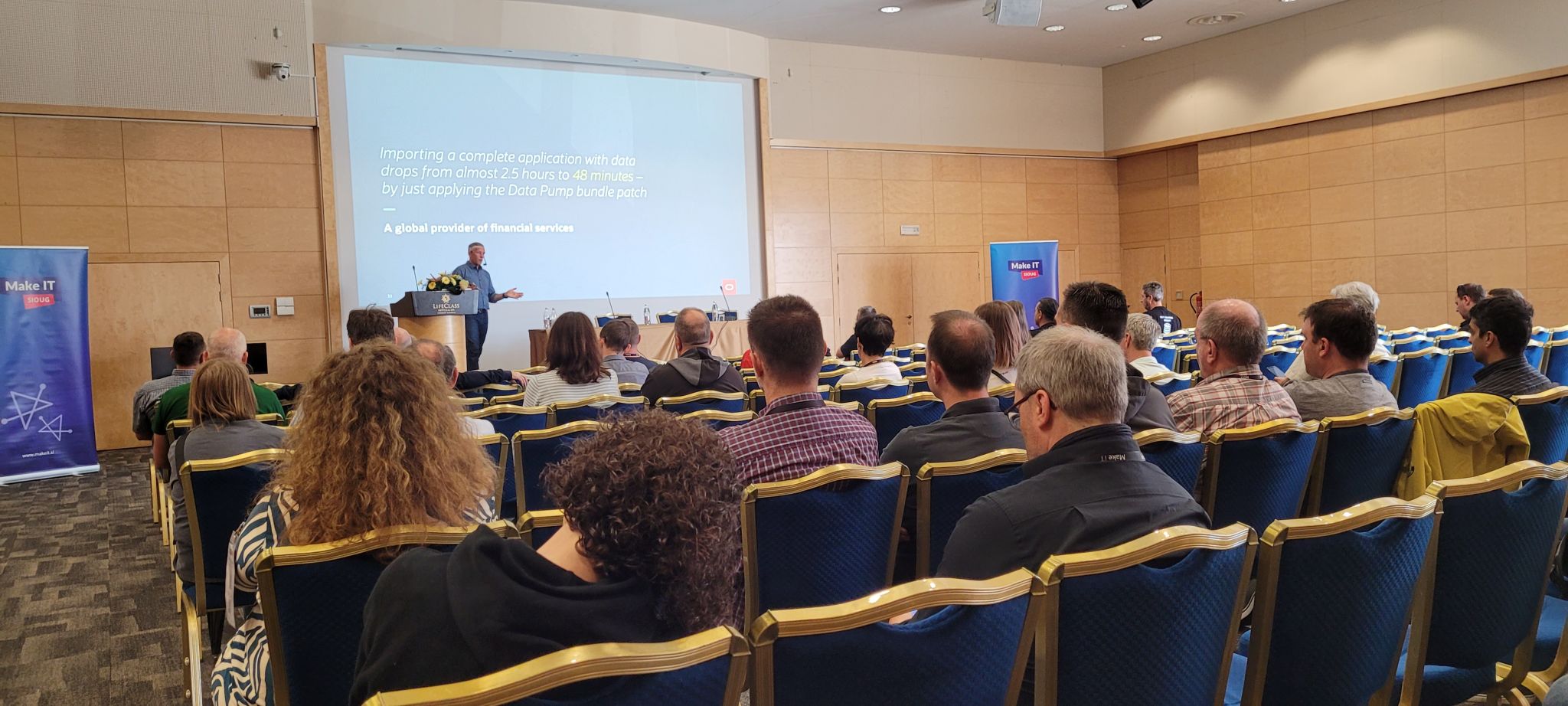
In the last days of May, I had the absolute pleasure of attending the MakeIT 2024 conference. Once again, the conference was held in the beautiful seaside city of Portorož, Slovenia.
The conference is a joint venture with the JCON conference, so you can catch one or two sessions on Java as well. I really value learning about related technologies as well. This year I listened in on caching options in Java and the use of JDBC driver.
You should come next year. There is also a good selection of English speakers, so even for foreigners, there is a reason to travel.
The Slides
Workshop – Patching Oracle Database
This is a full workshop on patching Oracle Database. It includes a hands-on lab, so you can try it on your own.
You should flip through the slides if you want a deep dive on patching.
Best Practices for Upgrade to Oracle Database 23ai
This session and the slides help you prepare for the next long-term support release of Oracle Database.
Patch Me If You Can
This session and the slides give a quick fly-over of the essentials of patching.
Oracle Data Pump – News, Internals, Tips and Tricks
I had the pleasure of talking about Oracle Data Pump and presenting some new features. If you’re curious about a faster way of creating indexes and adding constraints, you can flip through the slides.
Thanks
Thanks to the organizer of MakeIT 2024 for pulling off yet another successful conference, to the sponsors for making it all possible, and to everyone who attended my sessions or the conference in general.
Reduce downtime to the time it takes to perform a switchover.
Test the patching procedure on the standby database.
I received an interesting question the other day:
I have the following two Data Guard configurations. I want to patch all the databases using standby-first patch apply. How do I do that when I have primary and standby databases running out of the same Oracle home on the same machine?
Requirements
In this case, the databases are on 19.17.0, and the customer wants to patch them to 19.23.0.
To use standby-first patch apply, you must meet a set of requirements, one being:
Data Guard Standby-First Patch Apply is supported between database patch releases that are a maximum of one year (1 year) apart based on the patch release date.
Here are the release dates of the following Release Updates:
19.17.0: October 2022
19.23.0: April 2024
So, in this case, the customer can’t use standby-first patch apply directly. There is a year and a half in between. They need to patch cycles in this case:
Patch to 19.21.0 (release October 2023)
Patch to 19.23.0 (release April 2024)
In the future, they should apply patches more often to avoid ending up in this situation again.
Patching Oracle Home
The customer has one Oracle home on each server from where both databases run. On any server, there is a primary and a standby database (from two different Data Guard configs).
The customer uses in-place patching. If they patch the entire Oracle home, it means one of the primary databases is now on a higher Oracle home than its standby database, which is not allowed.
The standby database is the only one which may run on a higher patch level.
Using the above configuration with primary and standby databases running out of the same Oracle home, you can’t use in-place patching and standby-first patch apply.
The customer must switch to out-of-place patching to achieve this. Then you can patch standby databases first, then the primaries.
I just finished my presentation at the UKOUG conference. This time, it was held at the Oracle office in Reading. Two intense days full of learning experiences.
It’s the 40th anniversary of UKOUG – that’s truly amazing. The community started when I was just a little child and still lives on today, what a change tech has undergone since then.
Congratulations to the board and the entire community on the 40th anniversary.
The Slides
Patch Me If You Can – Grid Infrastructure Edition
This is a modification of an existing talk about database patching, but mostly on Oracle Grid Infrastructure. But since Oracle Database and Grid Infrastructure go hand in hand, it also has some database stuff.
You should flip through the slides if you work with Oracle Grid Infrastructure. And remember – always patch out-of-place.
Help! My Database is still on 8i!
I also had the opportunity to close the conference with my 8i talk. I really like this talk because it is a walk down memory lane. Plus, it includes demos using Oracle 8i Database. It’s cool to be old school.
For a little laugh, you can find a comparison of Oracle Database releases and mobile phones of the same age.
Thanks
Thanks to the board of UKOUG and the organizers for pulling yet another successful conference. Thanks to the sponsors making it all possible and to everyone who attended my sessions or the conference in general.
It keeps impressing me how much you can learn in such a short time. My head is full. Luckily, the weekend is coming up.
P.S. The chocolate fountain was amazing (see below)!
When you have created a new GI home and applied all the necessary patches, you can turn it into a golden image. Later on, you can deploy from that golden image and avoid updating OPatch and apply patches.
How to Create a Golden Image
First, only create a golden image from a freshly installed Oracle Home. Never use an Oracle Home that is already in use. As soon as you start to use an Oracle Home you taint it with various files and you don’t want to carry those files around in your golden image. The golden image must be completely clean.
Then, you create a directory where you can store the golden image:
Be sure to do this before you start to use the new GI home.
The installer creates the golden image as a zip file in the specified directory. The name of the zip file is unique and printed on the console. You can also use the secret parameter -name to specify a name for the zip file. To name the zip file gi_19_20_0.zip:
No software must run out of the Oracle Home, when you create the gold image. Don’t use a production Oracle Home. I recommend using a test or staging server instead.
You can find CVU in the GI home, but I recommend always getting the latest version from My Oracle Support.
3. Roll Back Node 1
The GI stack (including database, listener, etc.) needs to restart on each instance. But I do the rollback in a rolling manner, so the database stays up all the time.
I drain connections from the first node, copenhagen1.
This step restarts the entire GI stack, including resources it manages (databases, listener, etc.). This means downtime on this node only. The remaining nodes stay up.
In that period, GI marks the services as OFFLINE so users can connect to other nodes.
If my database listener runs out of the Grid Home, GI will move it to the new Grid Home, including copying listener.ora.
In the end, GI restarts the resources (databases and the like).
I update any profiles (e.g., .bashrc) and other scripts referring to the GI home.
I verify that the active GI home is the new GI home:
I roll back the second node, copenhagen2, using the same process as the first node, copenhagen1.
I double-check that the CURRENT_NODE environment variable gets updated to copenhagen2.
When I use crsctl query crs activeversion -f to check the cluster upgrade state, it will now be back in NORMAL mode, because copenhagen2 is the last node in the cluster.
5. Cluster Verification Utility
I use Cluster Verification Utility (CVU) again. Now I perform a post-rollback check. I do this on one node only:
My cluster is now operating at the previous patch level.
Appendix
SwitchGridHome Does Not Have Dedicated Rollback Functionality
OPatchAuto has dedicated rollback functionality that will revert the previous patch operation. Similar functionality does not exist when you use the SwitchGridHome method.
There is no real rollback option as this is a switch from OLD_HOME to NEW_HOME
To return to the old version you need to recreate another new home and switch to that.
Keeping the GI and database patch in sync is a good idea. But when you need to roll back, you are in a contingency. Only roll back the component that gives you problems.
Then, you will be out of sync for a period of time until you can get a one-off patch or move to the next Release Update. Being in this state for a shorter period is perfectly fine – and supported.

















 Databases Are Fun