
AutoUpgrade New Features: Download Tools (AHF, CVU, SQLcl)

Once you try downloading patches using AutoUpgrade, you’ll never do it from My Oracle Support again.

But what if you want to download:

Do you really have to do that from My Oracle Support? Of course – AutoUpgrade has you covered!

Download Tools

  1. I’ve already configured AutoUpgrade to download patches.

  2. I create a config file:

    global.global_log_dir=/home/oracle/autoupgrade/logs
    global.keystore=/home/oracle/autoupgrade/keystore
    global.folder=/home/oracle/autoupgrade/patches
    
    patch1.platform=LINUX.X64
    patch1.target_version=19
    patch1.patch=SQLCL,AHF,CVU
    
    • Notice the patch specification. It contains the three new keywords that instruct AutoUpgrade to download the tools.
  3. I start AutoUpgrade in download mode:

    AutoUpgrade Patching 26.3.260401 launched with default internal options
    Processing config file ...
    Loading AutoUpgrade Patching keystore
    AutoUpgrade Patching keystore is loaded
    
    Connected to MOS - Searching for specified patches
    
    -----------------------------------------------------
    Downloading files to /home/oracle/autoupgrade/patches
    -----------------------------------------------------
    PLACEHOLDER - DOWNLOAD LATEST AHF (TFA and ORACHK/EXACHK)
        File: AHF-LINUX_v26.3.1.zip - LOCATED
    
    Standalone CVU (OL8+, RHEL8+) January 2026
        File: cvupack_linux_ol8_x86_64.zip - LOCATED
    
    sqlcl-latest.zip 26.1.2.132.1334 (May 2026)
        File: sqlcl-latest.zip - LOCATED
    ------------------------------------------------------	
    
  • AutoUpgrade places the latest version of the tools in the download folder.

  • Nice and simple.

Multiple Platforms

  • If I have multiple platforms, I can download for all of them:

    patch1.platform=LINUX.X64
    patch1.target_version=19
    patch1.patch=SQLCL,AHF,CVU
    
    patch2.platform=WINDOWS.X64
    patch2.target_version=19
    patch2.patch=SQLCL,AHF,CVU
    
    patch3.platform=AIX.X64
    patch3.target_version=19
    patch3.patch=SQLCL,AHF,CVU
    
    • Notice how each platform has its own prefix (patch1, patch2, and patch3).
  • When I start AutoUpgrade in download mode, it downloads the tools for the three platforms.

That’s It

There are several tools that help you work with Oracle AI Database. Don’t miss out, update the tools and benefit from the latest enhancements.

Do you have a favorite tool that AutoUpgrade should download for you? Drop a comment and I’ll see what we can do.

Happy patching!

AutoUpgrade New Features: Download the Newest AutoUpgrade.jar

I’ve told you a million times:

Always get the latest version of AutoUpgrade!

A while ago, AutoUpgrade even became available for direct download from Oracle.com. But it must be even easier.

Now, AutoUpgrade downloads the latest version of itself when you use the keywords RECOMMENDED or AU. Here’s an example:

global.global_log_dir=/home/oracle/autoupgrade-patching/log
global.keystore=/home/oracle/autoupgrade-patching/keystore
global.folder=/home/oracle/autoupgrade/patches
patch1.target_version=19
patch1.patch=RECOMMENDED

I start AutoUpgrade:

java -jar autoupgrade.jar -config download.cfg -mode download -patch

Conveniently, AutoUpgrade grabs the latest version after downloading the patches:

Connected to MOS - Searching for specified patches

-----------------------------------------------------
Downloading files to /home/oracle/autoupgrade/patches
-----------------------------------------------------
DATABASE RELEASE UPDATE 19.30.0.0.0(REL-JAN260130)
    File: p38632161_190000_Linux-x86-64.zip - LOCATED

...

autoupgrade.jar 26.2 (February 2026)
    File: autoupgrade.jar - LOCATED
-----------------------------------------------------

Simple and easy!

Other Tools

Besides AutoUpgrade, there are other important tools for Oracle AI Database.

Here’s a little sneak peek at what the next version of AutoUpgrade brings. Using this config file:

global.global_log_dir=/home/oracle/autoupgrade-patching/log
global.keystore=/home/oracle/autoupgrade-patching/keystore
global.folder=/home/oracle/autoupgrade/patches

patch1.target_version=19
patch1.patch=AHF,CVU,SQLCL

You’ll get the latest versions of:

  • Autonomous Health Framework
  • Cluster Verification Utility
  • SQLcl

Leave a comment if you think there are other tools that AutoUpgrade should get for you.

Why Aren’t You Using SQLcl?

Does this look familiar?

When you make a typo and realize "arrow up" doesn't work

All over Linux you can use arrow up to get the latest command and edit it. But not in SQL*Plus! Something I used to forget many times a day…

I was recently in a presentation where the presenter had a really bad day – typing-wise, that is. He kept making typos all the time and he always ended up copying the text over in an editor, do the changes, and paste back. In the end you could really feel his frustrations (even though it was a virtual presentation). I really felt with that guy, probably because it could just as well be me. Oh, that feeling you get after typing a lengthy SQL only to find a stupid typo!!!

I gave up on my typing skills a long time ago and I am now happy user of SQLcl. So when I make a typo I just do this:

Edit your statements in SQLcl

But I still meet a lot of people that are stuck in the last millenium aka SQL*Plus. So, the big question is:

Why aren’t you using SQLcl?

With the alias function in SQLcl I can do this:

Create your own alias to quickly execute commands

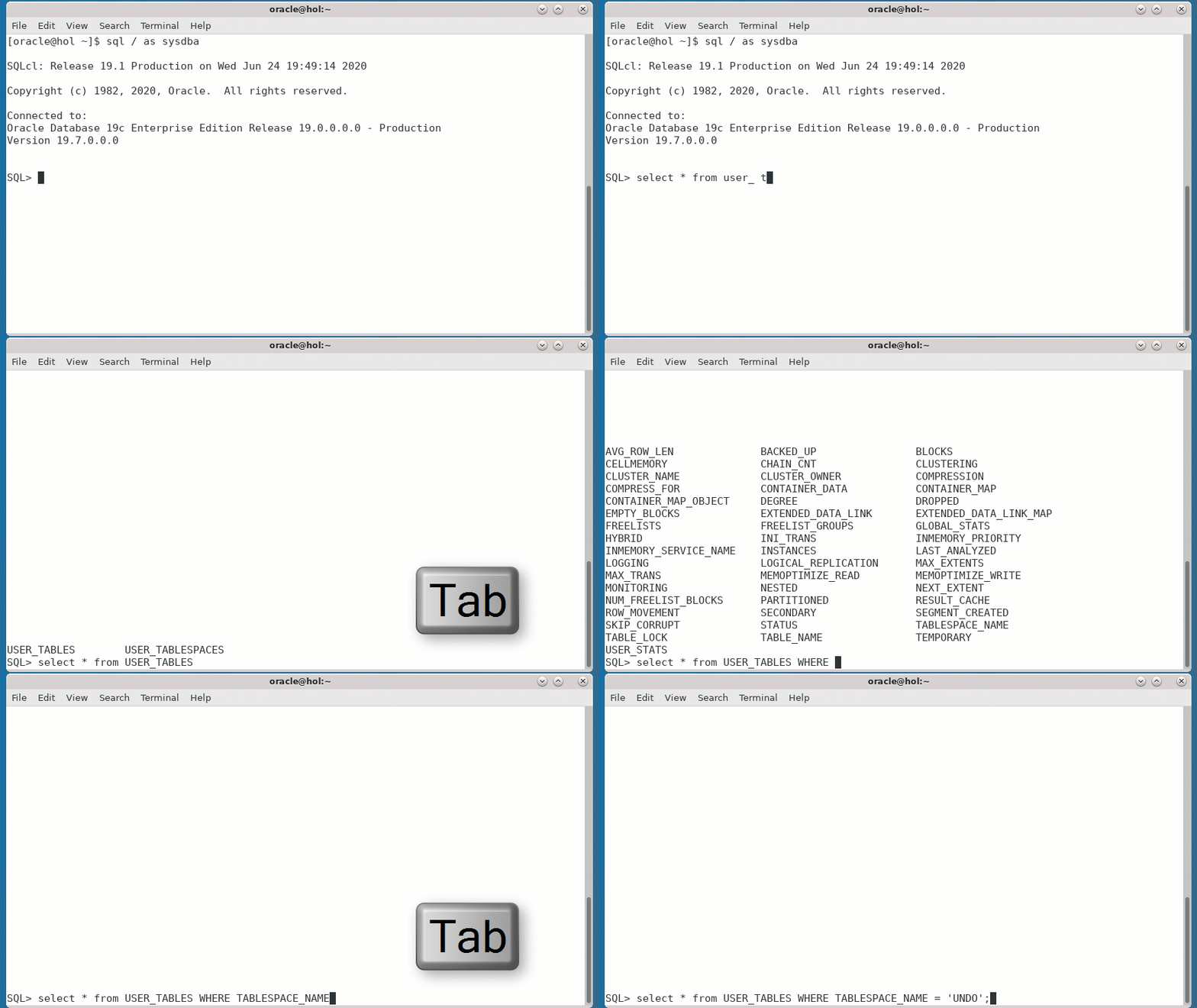
With tab completion I can do this:

Tab completion - works on tables, views, keywords, columns ...

And look at the beautifully formatted query result I get in SQLcl using set sqlformat ansiconsole:

SQLcl can format query result in a much better way

Still not convinced? Check out this post from fellow Product Manager Jeff Smith in which he sells you SQLcl in 1 minute.

May this be the day where you did your last SQL*Plus typo!

My Aliases

For your reference here are the aliases that I used in the demo:

pdbs = select con_id, name, open_mode, restricted from v$pdbs order by con_id
sc = exec execute immediate 'alter session set container='||:one
scr = alter session set container=CDB$ROOT
ts = select p.con_id, p.name, vt.name, ct.encrypted, ct.status, ct.contents, ct.compress_for from v$tablespace vt, v$pdbs p, cdb_tablespaces ct where vt.con_id=p.con_id(+)  and vt.name = ct.tablespace_name(+) and vt.con_id = ct.con_id (+) order by vt.con_id, vt.name