How to Perform Standby-first Patch Apply When You Have Different Primary and Standby Databases in the Same Oracle Home

I am a big fan of Oracle Data Guard Standby-First Patch Apply. You can:

  • Reduce downtime to the time it takes to perform a switchover.
  • Test the patching procedure on the standby database.

I received an interesting question the other day:

I have the following two Data Guard configurations. I want to patch all the databases using standby-first patch apply. How do I do that when I have primary and standby databases running out of the same Oracle home on the same machine?

Overview of Data Guard standby-first environment

Requirements

In this case, the databases are on 19.17.0, and the customer wants to patch them to 19.23.0.

To use standby-first patch apply, you must meet a set of requirements, one being:

Data Guard Standby-First Patch Apply is supported between database patch releases that are a maximum of one year (1 year) apart based on the patch release date.

Here are the release dates of the following Release Updates:

  • 19.17.0: October 2022
  • 19.23.0: April 2024

So, in this case, the customer can’t use standby-first patch apply directly. There is a year and a half in between. They need to patch cycles in this case:

  • Patch to 19.21.0 (release October 2023)
  • Patch to 19.23.0 (release April 2024)

In the future, they should apply patches more often to avoid ending up in this situation again.

Patching Oracle Home

The customer has one Oracle home on each server from where both databases run. On any server, there is a primary and a standby database (from two different Data Guard configs).

The customer uses in-place patching. If they patch the entire Oracle home, it means one of the primary databases is now on a higher Oracle home than its standby database, which is not allowed. The standby database is the only one which may run on a higher patch level.

Using the above configuration with primary and standby databases running out of the same Oracle home, you can’t use in-place patching and standby-first patch apply.

The customer must switch to out-of-place patching to achieve this. Then you can patch standby databases first, then the primaries.

Plus, you get all the other benefits of out-of-place patching.

Datapatch

Once all the databases in a Data Guard configuration run in the new Oracle home, you still haven’t completed the patching process:

A patch or patch bundle is not considered fully installed until all of the following actions have occurred:

  • Patch binary installation has been performed to the database home on all standby systems.
  • Patch binary installation has been performed to the database home on the primary system.
  • Patch SQL installation, if required by the patch, has been performed on the primary database and the redo applied to the standby database(s).

You must do the above steps in the specified order, and the last step is to execute Datapatch:

$ $ORACLE_HOME/OPatch/datapatch

Step-by-step

You can use AutoUpgrade to patch Oracle Data Guard.

Happy Patching!

Oracle Database 23ai Is Here – Time to Sharpen Multitenant Skills

Last week Oracle announced the release of Oracle Database 23ai with many significant enhancements. It is available in Oracle Cloud Infrastructure but according to Release Schedule of Current Database Releases (Doc ID 742060.1) other platforms are following soon.

One important thing about Oracle Database 23ai is that it only supports the multitenant architecture. Once you upgrade beyond Oracle Database 19c, you must also convert your database to a pluggable database.

To give you the best possible starting point for the multitenant migration, our team has prepared two webinars about the multitenant architecture. Actually, we planned on just one. Still, we have so many things to share that we decided to make two webinars. When product managers get a chance to talk, they talk a lot!

Move to Oracle Database 23ai – Everything you need to know about Oracle Multitenant

Part 1

May 16, 14:00 CEST, 2024

  • Multitenant architecure
    • Introduction
    • Consolidation strategies
    • Benefits
  • Creation of container database
    • Recommendations
    • Parameters
  • Migration methods
    • Best practices
    • Data Guard
    • RAC
    • Transparent Data Encryption (TDE)
    • What to remember after migration
    • Rollback and fallback
    • Customer case

Part 2

June 27, 14:00 CEST, 2024

  • Operations
    • Cloning
    • Connecting
    • Running scripts
    • Resource Manager
    • Tips and tricks
    • Recommendations
    • Customer case
  • Patching
    • Entire CDB
    • Individual PDB
    • Recommendations
    • Datapatch
  • Upgrading
    • CDB upgrades
    • PDB upgrades (unplug-plug)
    • Replay upgrade
    • Best practices
    • Downgrade
    • Customer case

Sign Up

You can sign up here. My team (Mike, Rodrigo, Roy and Alex) will be there and answer all your questions. I promise we won’t end the webinar until there are no more questions.

If you miss the webinar, you can watch a recording later on our YouTube channel. Be sure to subscribe so you don’t miss out.

Even if you already use Oracle Database on multitenant architecture, I guarantee there are still new things to learn.

As always: All tech, no marketing!

It’s a Wrap – OUGN 2024

I just finished my presentation at OUGN 2024 conference in Oslo, Norway. Once again, it was held at the Rebel, which is an awesome location. Two intense days full of learning experiences.

It’s my second time at the conference, it I must give it my strongest recommedation. If you’re in Northen Europe, it’s an easy flight to Oslo and you really get great value for it.

The Slides

Introduction to Multitenant Architecture

What is multitenant? How does it differ from the non-CDB architecture. How can I move from non-CDB to a pluggable database? I answered all those questions and much more.

You should flip through the slides if you want an overview of the multitenant architecture.

Move to Oracle Database 23ai

This session and the slides help you prepare for the next long-term support release of Oracle Database.

More Multitenant

If you need to know more about multitenant, be sure to join our two webinars coming up in May and June.

Thanks

Thanks to the board of OUGN and the organizers for pulling yet another successful conference. Thanks to the sponsors making it all possible and to everyone who attended my sessions or the conference in general.

Impressions

The Dolerean

Beautiful sunset during the approach to Copenhagen Airport.

I Need Patch 35836860. Is It in 19.21.0?

The other day, someone asked:

I need the fix for bug 35836860 in my Oracle Database. I am planning to install the Release Update 19.21.0. How do I know if this Release Update includes the patch?

What is the easiest way to tell whether a Release Update contains a specific patch for Oracle Database?

How To

The easiest way to check for patch inclusion is ORAdiff.

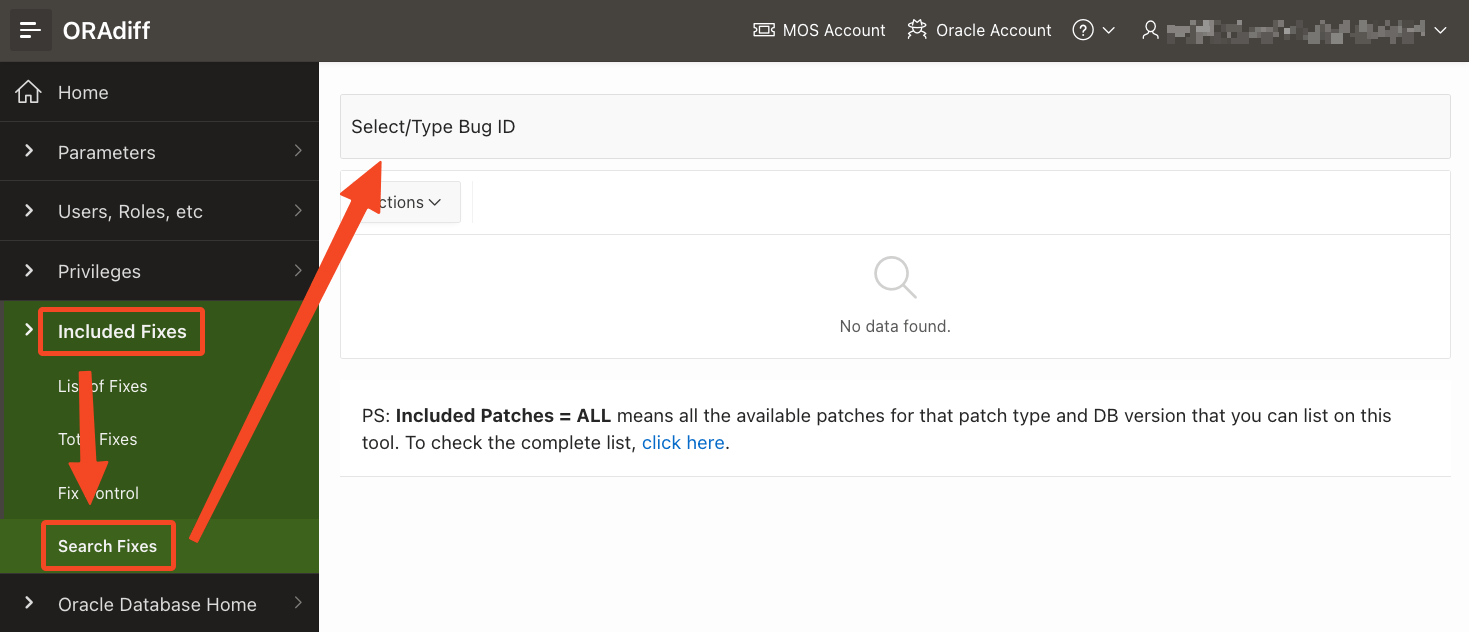
I navigate to Included Fixes and Seach Fixes and input the bug number.

Finding patch inclusion information for a bug / patch in Oracle Database

Next, the report tells me that Release Update 19.22.0 includes this patch. All newer Release Update include this patch as well because Release Updates are always cumulative.

Finding patch inclusion information for a bug / patch in Oracle Database

I can even see that MRP 4 to 6 for 19.20.0 also includes this fix. For whatever strange reason, the MRPs for 19.21.0 do not include this fix. Here’s a video if you want to learn more about MRPs.

ORAdiff

Remember that ORAdiff is a free tool for anyone with an Oracle account.

If you need further tips on using ORAdiff, we have a playlist on our YouTube channel. Be sure to subscribe so you don’t miss out on anything.

Want More?

Since we are talking about patching Oracle Database, it might be good to refresh your knowledge with our webinar Oracle Database Release and Patching Strategy for 19c and 23ai.

Open the video on YouTube, and you can dive right into each individual chapter.

My Query Performs Horrible, Fix It!

Many years ago, I used to work as an operational DBA, and I remember colleagues asking the following:

My query runs very slow. The other day it all ran fine, but now it’s hanging. What’s going on? Fix it!

They might even start the occasional rant about relational doesn’t scale and all the other blah blah blah.

Sounds familiar? What if you could solve the problem by just running:

EXEC DBMS_SPM.ADD_VERIFIED_SQL_PLAN_BASELINE('<sql_id');

The query runs at warp speed again, and the users are happy.

In Oracle Database 19.22.0, that’s possible.

What’s Going On

The procedure uses SQL Plan Management: the best solution to ensure plan stability.

It will:

  • Search all your SQL tuning sets, including automatic SQL tuning sets, AWR, and cursor cache to find other plans for that SQL.
  • Test each of the plans to find the best one.
  • Create a SQL plan baseline with the best plan.

During the next execution, the database will use the best plan.

Problem solved!

SQL Plan Management

I’m a huge fan of SQL Plan Management. It is one of the most underrated features in Oracle Database.

What is your biggest fear when you upgrade? Often, the answer is changing plans. SQL Plan Management effectively solves that problem, and we recommend it as part of our performance stability prescription.

Afterwords

In fact, I’ve never been a performance expert. When I was tasked with a performance issue, I knew it would take a lot of time.

Over time, I found a better way of solving these issues. I would turn my chair and look directly into the wrinkled eyes of Frank, my trusted grey-haired colleague.

Using my cutest little puppy face and soft voice, young me would ask for advice and smoothly hand over the task to him.

But not everyone has a Frank in your office, so DBMS_SPM.ADD_VERIFIED_SQL_PLAN_BASELINE is very useful.

Experience and grey hair rock!

Further Reading

Real-World Database Upgrade and Migration 19c and 23c

Mike Dietrich and I are hosting two in-person workshops in Sweden and Denmark in early May. Yes, that’s right: It’s in-person.

Mike Dietrich and Daniel Overby Hansen will guide you through several different examples of upgrade, migration and consolidation techniques and strategies – shown with real world customer cases.

  • How to take full advantage of the new features and options in Oracle Database 19c and 23c
  • The smoothest and fully unattended migration to the CDB architecture
  • Real World Best Practices and Customer Cases
  • Performance Stability Prescription
  • What’s new, what’s coming (especially for DBAs) in Oracle Database 23c

Oracle Real-World Database Upgrade and Migration 19c and 23c with Mike Dietrich and Daniel Overby Hansen

Sweden

  • Oracle office, Solna
  • Tuesday 7 May 2024, 09:00 – 16:30
  • Sign up

Denmark

  • Oracle office, Hellerup
  • Wednesday 8 May 2024, 08:00 – 15:00
  • Sign up

Secure your seat as quickly as possible. Seats are limited!

Agenda

To whet your appetite, here is the agenda:

Agenda
Release Strategy with Oracle Database 23c
Oracle Database Patching – Welcome to the Jungle
Upgrade to Oracle Database 23c
Migration to the CDB architecture – smoothly and unattended
Data Pump: The universal tool, for ADB migrations and more
Cloud Migration Advisor
Performance Stability Prescription
Secret underscores
Insights into the Oracle Database Development process
Oracle Database 23c – What’s new, what’s coming

Remember our mantra: All tech, no marketing!

I hope to see you at our workshops.

A Different Day at the Office

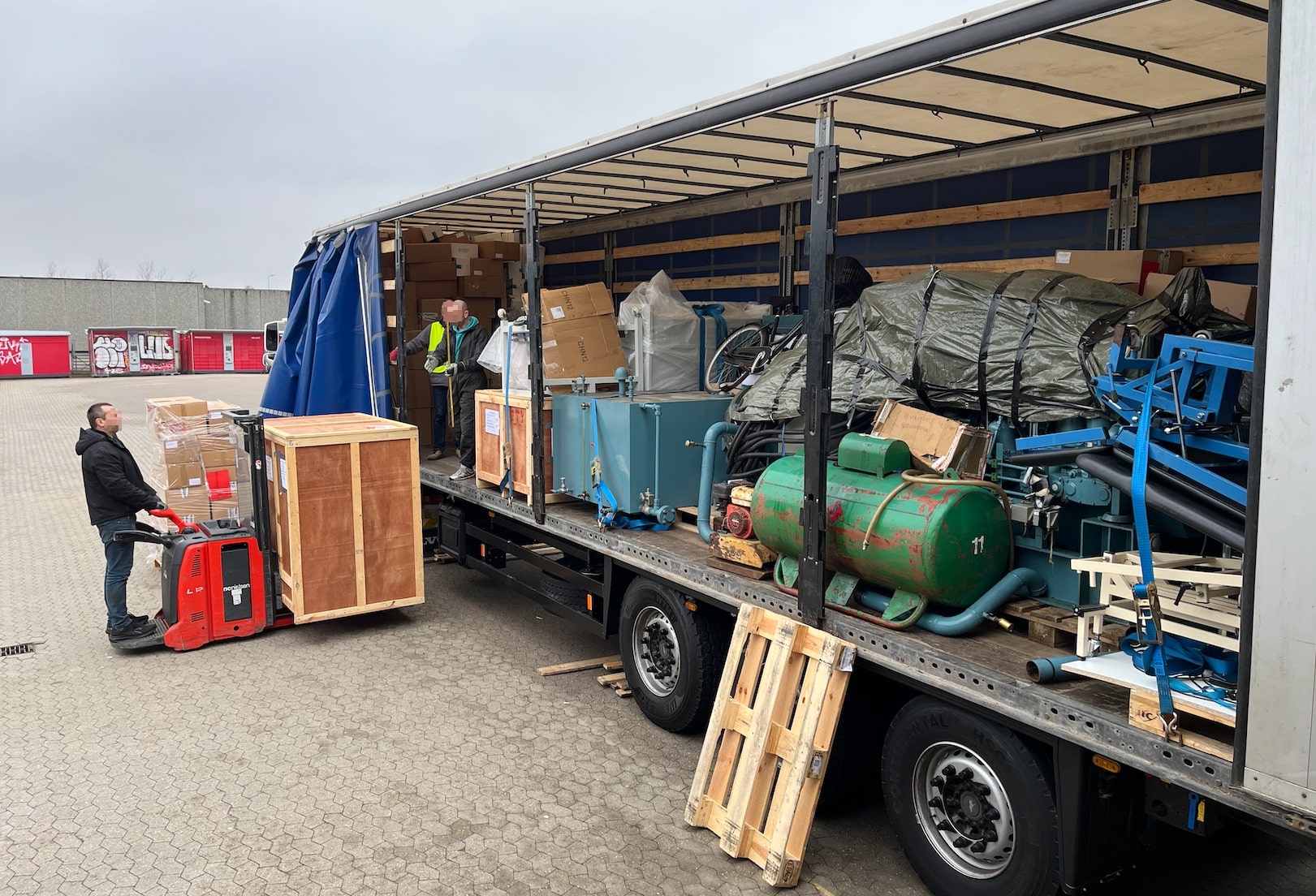
Yesterday, I had quite a different day at the office. Instead of typing on the keyboard, I spent the day loading a truck bound for Ukraine with humanitarian aid.

I had a fantastic day with the volunteers at Bevar Ukraine and colleagues from Oracle. We loaded a truck with:

  • 50 kW diesel generator
  • Medical supplies
  • Hospital beds
  • Clothes
  • Other necessities

Loading a truck at Bevar Ukraine with humanitarian aid

Bevar Ukraine

What is Bevar Ukraine?

Bevar Ukraine is an independent Danish humanitarian non-profit organization whose purpose is to provide humanitarian aid in Ukraine and to support refugees. The organization works to combat poverty and strengthen civil society. Bevar Ukraine supports the UN’s global goals for sustainable development.

It is run by volunteers who spend much time and effort helping the victims in Ukraine.

I am glad I could spend a day with these wonderful people and help them in their mission. It was touching to listen to their stories. Thank you, Bevar Ukraine!

I encourage you to donate to their organization and help those in need.

Oracle Volunteering

As an employee of Oracle, I can spend my work time on voluntary work. We call this Oracle Volunteering:

Oracle Volunteers lead and participate in virtual and in-person projects with hundreds of nonprofits and public institutions year-round. They support students and educators, protect nature and wildlife, and strengthen communities by helping people in need.

Every year, I can spend a whole week on voluntary work. I feel proud of my employer when they take action and help make the world a better place. Thank you, Oracle!

Reflections

I am grateful to live in a peaceful part of the world. But I feel for those less fortunate. We could do much more together if we all made friends.

In my previous job, I worked together with many Ukrainians. They were all young and eager to sharpen their skills in software development. They worked hard to make a good living for themselves and Ukraine.

Now, much of that is lost due to the unjust occupation and war. Perhaps some of my former colleagues are now dead because they defended their country. How tragic…

Stop the war and free Ukraine!

How to Detect and Repair Corruption in Your Oracle Database

Over time, corruptions can sneak into your Oracle Database. Such corruptions may surface at the most inconvenient times, like upgrades, migrations, or PDB conversions. Here is a quick way of checking your Oracle Database and increasing your chance of success.

Oracle Database Dictionary Check

The documentation states:

DBMS_DICTIONARY_CHECK is a read-only and lightweight PL/SQL package procedure that helps you identify Oracle Database dictionary inconsistencies that are manifested in unexpected entries in the Oracle Database dictionary tables or invalid references between dictionary tables. Oracle Database dictionary inconsistencies can cause process failures and, in some cases, instance crash.

How to Execute a Dictionary Check

  • First, the database must be on Oracle Database 19.22.0 or higher.
  • Start the check:
    set serverout on
    exec dbms_dictionary_check.full;
    
  • The database spools to the console and a trace file:
    dbms_dictionary_check on 02-MAR-2024 13:31:56
    ----------------------------------------------
    Catalog Version 19.0.0.0.0 (1900000000)
    db_name: UP19
    Is CDB?: NO
    Trace File:
    /u01/app/oracle/diag/rdbms/up19/UP19/trace/UP19_ora_3343_DICTCHECK.trc
    
                                    Catalog       Fixed
    Procedure Name                  Version    Vs Release    Timestamp      Result
    --------------------------- ... ---------- -- ---------- -------------- ------
    .- OIDOnObjCol		       ... 1900000000 <=  *All Rel* 03/02 13:31:56 PASS
    .- LobNotInObj		       ... 1900000000 <=  *All Rel* 03/02 13:31:56 PASS
    .- SourceNotInObj	       ... 1900000000 <=  *All Rel* 03/02 13:31:56 PASS
    
    ...
    
    .- LobSeg                   ... 1900000000 <=  *All Rel* 03/02 13:31:56 PASS
    ---------------------------------------
    02-MAR-2024 13:31:56  Elapsed: 0 secs
    ---------------------------------------
    Found 0 potential problem(s) and 0 warning(s)
    Trace File:
    /u01/app/oracle/diag/rdbms/up19/UP19/trace/UP19_ora_3343_DICTCHECK.trc
    
    PL/SQL procedure successfully completed.
    
    • In this case, all checks pass.
  • If there are any warnings or errors, you can find a detailed description of the check in the documentation.
  • In multitenant, you run the check in the root container and all PDBs. The PDBs are most important.
  • In Oracle Database 23ai, the full check even has a fix mode which can correct certain known issues.

Words of Advice

  • Run the check in due time before a major maintenance operation. Although many checks have a fix option, you sometimes need to engage with Oracle Support. This can take time, so don’t do it the day before an important upgrade.

  • AutoUpgrade makes your life easier. Of course, it can run the dictionary check for you. Add the following to your config file:

    <prefix>.run_dictionary_health=full
    

    During the pre-upgrade analysis, AutoUpgrade executes the dictionary check and stores the full report in the precheck folder in the AutoUpgrade log directory.

The Artist Formerly Known As

If you think: This does sound very similar to health check or hcheck.sql, then you are on to something. Oracle moved the health check code into the database. No need to separately download the script; it’s always there.

Weed out those corruptions!

Kickstart Learning in 2024

What better way to start the new year of the Dragon than to learn something new. If it sounds like a good idea, you’ll be pleased to know that we have two new webinars coming your way shortly.

Like the previous webinars, it’s all tech, no marketing!

Cross Platform Migration – Transportable Tablespaces to the Extreme

Recently, the team and I worked with two big customers who had to migrate cross-endian to Exadata. Both customers had huge and very active databases and needed to migrate with as little downtime as possible.

In this webinar, you can hear details on how one of the customers performed the migration using a new procedure developed by Oracle. In addition, we will share the lessons learned and our new best practices for such migrations.

> Transportable Tablespaces and Full Transportable Export Import aren’t a secret feature. But there are many things to take care on when you migrate cross-platform, and especially cross-Endianness. Today we will give you insights and show you how we worked together to migrate a 200TB database writing up to 15TB redo per day from Oracle SPARC SuperCluster to Oracle Exadata with a database downtime of less than 6 hours. Follow us into the extreme. Extreme load. Extreme complexity. And an extremely skilled team working toegther. Such projects aren’t done in 4 weeks. And we will tell you the entire story, from start to the nights of the nights.

Sign up here.

Move to Oracle Database 23c – Everything you need to know about Oracle Multitenant

Oracle Database 23c is on its way. Hopefully, it doesn’t come as a surprise to you that this release supports the multitenant architecture only. If you haven’t migrated your Oracle Database yet, you’ll need to do so as part of the upgrade to Oracle Database 23c.

This webinar shares all the things you need to know to migrate a database to the multitenant architecture successfully, including essential parts like Data Guard, backup, and your rollback plans.

> Oracle Database 23c does only support the CDB architecture. If you haven’t migrated to Oracle Multitenant yet, then you will be with your upgrade to 23c. How do you approach it in the most efficient way? What are the other options? And why is this a migration unless you have PDBs already? All this and way much more about how to work with Multitenant, how AutoUpgrade automates the entire move for you, end-to-end – and best practices and tips and tricks. We’ll guide you, and you will be ready to move to Oracle Database 23c right away

Sign up here.

Registration

The webinars are free, of course. You just need to sign up.

Our entire team will be present during the webinar to answer all your questions. I promise we won’t stop the webinar until we have answered all the questions. If you cannot participate, you can find the recording shortly after the webinar.

If you can’t wait, you can start learning already by watching the previous webinars.

Register your seat now.

How to Upgrade Encrypted Oracle Database and Move to New Server

Is Autoupgrade with TDE only possible for in place upgrade (same server)? Are there any ways to do it for out of place (new db home in a different server) with autoupgrade? It seems like the target_home have to be specified.

A reader asked that question on my blog.

The answer is yes; you can upgrade an Oracle Database and move to a new server. We are considering upgrading a non-CDB or an entire CDB using Transparent Data Encryption (TDE) Tablespace Encryption.

Move to New Server and Transparent Data Encryption

When you upgrade your Oracle Database, you often want to move to new hardware. AutoUpgrade fully supports this use case. Mike Dietrich mentions this in his blog post and video.

When you upgrade an encrypted non-CDB or entire CDB, the database must have an auto-login keystore.

There are no further requirements.

The Instructions

I am using the DB12 database from our hands-on lab. You can provision a lab and try it out yourself (for free). See the appendix for instructions on how to encrypt the DB12 database.

Old Server

  1. Always use the latest version of AutoUpgrade.
  2. Create a config file:
    upg1.source_home=/u01/app/oracle/product/12.2.0.1
    upg1.sid=DB12
    upg1.target_version=19
    
    • I don’t specify target_home because it does not exist on the old server. Instead, I specify target_version, so AutoUpgrade knows which checks to execute.
  3. Check the database for upgrade readiness:
    java -jar autoupgrade.jar -config DB12.cfg -mode analyze
    
  4. Downtime starts.
  5. Run the preupgrade fixups:
    java -jar autoupgrade.jar -config DB12.cfg -mode fixups
    
  6. Perform a clean shutdown of the database
    shutdown immediate
    

New Server

There is only one server in the lab environment, so I can’t physically move to a new server. But by moving the instance manually to the new home, I can simulate the same behavior.

  1. Move SPFile and password file to the new Oracle home on the new server. The below instructions work in the hands-on lab only:
    export OLD_ORACLE_HOME=/u01/app/oracle/product/12.2.0.1
    export NEW_ORACLE_HOME=/u01/app/oracle/product/19
    export ORACLE_SID=DB12
    cp $OLD_ORACLE_HOME/dbs/spfile$ORACLE_SID.ora $NEW_ORACLE_HOME/dbs
    cp $OLD_ORACLE_HOME/dbs/orapw$ORACLE_SID $NEW_ORACLE_HOME/dbs
    
  2. Register the instance in /etc/oratab:
    export NEW_ORACLE_HOME=/u01/app/oracle/product/19
    export ORACLE_SID=DB12   
    cp /etc/oratab /tmp/oratab
    sed '/^'"$ORACLE_SID"':/d' /tmp/oratab > /etc/oratab
    echo "$ORACLE_SID:$NEW_ORACLE_HOME:N" >> /etc/oratab
    cat /etc/oratab
    
    • Use srvctl as well if you have Oracle Grid Infrastructure.
  3. Move the database files (control files, redo logs, and data and temp files) to the new server.
    • If you need to change any of the paths, see the appendix.
    • Alternatively, unmount the storage from the old server and mount it on the new one.
  4. I want to use the new wallet_root parameter to configure TDE. I copy the keystore files to a new location that matches the naming requirements of wallet_root:
    export OLD_KEYSTORE=$ORACLE_BASE/admin/$ORACLE_SID/wallet
    export NEW_KEYSTORE=$ORACLE_BASE/admin/$ORACLE_SID/wallet/tde
    mkdir -p $NEW_KEYSTORE
    cp $OLD_KEYSTORE/cwallet.sso $NEW_KEYSTORE
    cp $OLD_KEYSTORE/ewallet.p12 $NEW_KEYSTORE
    
    • You should consider moving any backup keystore files as well.
  5. I start a new instance of the database in the new Oracle home and configure TDE using the new parameters:
    export ORACLE_HOME=/u01/app/oracle/product/19
    export PATH=$ORACLE_HOME/bin:$PATH
    sqlplus / as sysdba<<EOF
       startup nomount
       alter system set wallet_root='$ORACLE_BASE/admin/$ORACLE_SID/wallet' scope=spfile;
       shutdown immediate
       startup nomount
       alter system set tde_configuration='KEYSTORE_CONFIGURATION=FILE' scope=both;
    EOF
    
  6. Start the instance in upgrade mode:
    sqlplus / as sysdba<<EOF
       alter database mount;
       alter database open upgrade;
    EOF
    
  7. Create an AutoUpgrade config file:
    upg1.target_home=/u01/app/oracle/product/19
    upg1.sid=DB12
    
  8. Start AutoUpgrade in upgrade mode:
    java -jar autoupgrade.jar -config DB12.cfg -mode upgrade
    

That’s it! I just upgraded my encrypted Oracle Database and moved it to a new server.

Appendix

Keystore Type

You must have an auto-login database keystore to upgrade it on the new server. Check the keystore type in the source database:

select wrl_type, wallet_type from v$encryption_wallet;
  • AUTOLOGIN – You can copy the auto-login keystore file (cwallet.sso) from the old to the new server.
  • LOCAL_AUTOLOGIN – The keystore file is bound to the old server. You must create a new auto-login keystore on the new server.

To create a new local auto-login keystore:

startup mount
administer key management create local auto_login keystore ...;
shutdown immediate
startup upgrade

Hands-on Lab

If you want to try the procedure in our hands-on lab, you can use these instructions to encrypt the DB12 database.

  1. Add TDE configuration to sqlnet.ora:
echo 'ENCRYPTION_WALLET_LOCATION=(SOURCE=(METHOD=FILE)(METHOD_DATA=(DIRECTORY=$ORACLE_BASE/admin/$ORACLE_SID/wallet)))' >> $ORACLE_HOME/network/admin/sqlnet.ora
  1. Create keystore directory:
mkdir -p $ORACLE_BASE/admin/$ORACLE_SID/wallet
  1. Create the keystore and complete the TDE configuration:
sqlplus / as sysdba <<EOF
   --Restart to re-read sqlnet.ora with keystore setting
   shutdown immediate
   startup
   
   --Configure TDE
   ADMINISTER KEY MANAGEMENT CREATE KEYSTORE '$ORACLE_BASE/admin/$ORACLE_SID/wallet' IDENTIFIED BY "<tde-keystore-pwd>";
   ADMINISTER KEY MANAGEMENT SET KEYSTORE OPEN IDENTIFIED BY "<tde-keystore-pwd>";
   ADMINISTER KEY MANAGEMENT SET KEY IDENTIFIED BY "<tde-keystore-pwd>" WITH BACKUP;
   ADMINISTER KEY MANAGEMENT CREATE AUTO_LOGIN KEYSTORE FROM KEYSTORE '$ORACLE_BASE/admin/$ORACLE_SID/wallet' IDENTIFIED BY "<tde-keystore-pwd>";

   --Create data
   create tablespace users2 encryption encrypt;
   grant dba to appuser identified by oracle;  
   create table appuser.t1 tablespace users2 as select * from all_objects;
EOF

Locations

In the instructions, I am using the same paths for the database files. If you need to change the location of the control file or redo logs, then it might be easier to create a PFile on the source and use that instead of the SPFile.

If you need to change the location of data or temp files, it might be easier to re-create the control file. In this case, you need an alter database backup controlfile to '/tmp/ctl.txt' on the source database. Edit the trace file to generate the create controlfile statement.